
You now have two training options, you can choose to take a scheduled Instructor-led session (via Teams) or view eLearning/video training which is accessible whenever you choose to take the training. The content is the same whichever option you chose. You require a LearningHub account to register for PROMIS Training. For further information on how to create a LearningHub Account click here.
For further details on Training click on the related section below:



How to Register for a PROMIS Training Course?
To Register for a PROMIS Training course, follow the below steps:
- Login to Learning Hub
- Click on a direct LearningHub course link below
Or
- Login to Learning Hub
- Type in the Course ID, Title, or a few Keywords to search for a course. If you search using the Course Title, ensure you type in the exact course title. We advise using the Course ID.
- Select Search Courses or Enter on your keyboard
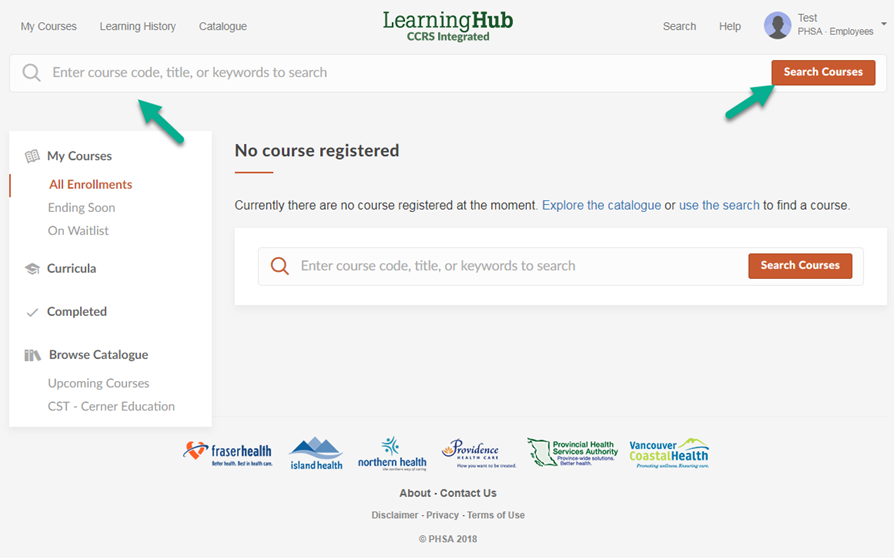
- Once you have located the course, select the title to be redirected to the course registration page where you will be able to select “Register Course”.
PROMIS Release Training
| PROMIS – Release Specific Training |
|---|
PROMIS 4.17 Release – Feb 23rd 2023Emergency Planning Course Description: The Emergency Management module will have the following changes made to it in the 4.17 release:
Learning Hub Link: https://learninghub.phsa.ca/Courses/30437/promis-4-17-emergency-planning-updates Training Document Link: https://promis.testing.canadian-visa-lawyer.com/wp-content/uploads/2023/02/EmergencyPlanning_4.17_FINAL.pdf
|
|
HD Catheter Reason Report Course Description: A report to identify the number of patients starting HD with a catheter during a certain time range and the reason for using the catheter mentioned. (Note: Will confirm with Janet Williams regarding training format but more than likely will be a one-pager training document). Training Document Link: https://promis.testing.canadian-visa-lawyer.com/wp-content/uploads/2023/02/HDCatheterReasonReport_FINAL.pdf |
|
Ability to capture water source data for HHD patients Course Description: A field to identify the water source and the modality it is required in. Training Document Link: https://promis.testing.canadian-visa-lawyer.com/wp-content/uploads/2023/02/HHDWaterSource_Final.pdf |
|
Transplant Referral / Document History Course Description: Uploading documents using the Document History module in PROMIS 4 and the addition of a column in the module to show what other modules the document is linked to. Training Document Link: https://promis.testing.canadian-visa-lawyer.com/wp-content/uploads/2023/02/DocumentHistory_TxReferral_FINAL.pdf |
|
Willing to Cross Course Description: Willing to Cross values will be received from Histotrac and displayed in PROMIS. |
|
HD Prescription Extract from Cerner Course Description: HD prescriptions received from Cerner will be displayed in PROMIS under HD Prescriptions. Autoloaded labels will appear next to autoloaded records and an Autoload Notes section will have information populated from Cerner too. Training Document Link:: https://promis.testing.canadian-visa-lawyer.com/wp-content/uploads/2023/02/HDPrescriptionExtract_Final.pdf |
|
Transplant Vaccine Report Course Description: Includes a report to display the list of patients belonging to the selected Transplant Program who are missing the required or recommended vaccinations. Training Document Link: https://promis.testing.canadian-visa-lawyer.com/wp-content/uploads/2023/02/TxProgramVaccine_FINAL.pdf |
|
Clinical Trials Course Description: This module is being moved to PROMIS 4. |
PROMIS 4.16 Release – November 27th 2022Modality Selection – LearningHub Registration Course Description: The Modality Selection module will now have options to indicate when patients refuse education for dialysis treatment options and/or transplant. This will also have an impact on the eGFR Report by displaying if the patients don’t have a modality selection record created and if they have declined education. |
|
Dialysis Prescription – Validation Button Course Description: A validation button will now be available to enable users to validate active dialysis prescriptions. This will be available for all PD, HD and Home Hemo prescriptions. |
|
Transplant First Course Description: Some additions will be made to the Kidney Transplant Referral Status. They include:
The Kidney Transplant Readiness Report can now be generated for Pre and Post Transplant patients and can also be streamlined by regional and primary centres. |
|
PCR Functional Status Course Description: Introducing PCR Functional Status Scale tool. |
|
TB Screening Updates Course Description: Revised updates to TB Screening Questionnaire and Report, IGRA Requisition and Chest X-ray Requisition |
|
Biopsy Results Course Description: Changes to required fields. |
|
Vascular Access Reports Course Description: Updates in Vascular Access Incidence Report, Transonic Report, Transonic Graph. |
|
ESAS Report Course Description: Changes to ESAS Assessment, a report parameters page, and the ability to export to Excel. |
|
PD Assist Course Description: Revised updates to PD assistance |
PROMIS 4.15 Release – July 10th 2022Emergency Planning Module Course Description: Will cover, Background (reason for the new features/changes).Overview (the uses of the Emergency Planning module).Navigation (the path to the module and the different tabs in it). Workflow (a description of the module, the new interface, its purpose, logic, any changes or new features such as changes in the EM User Management tab, creating primary and secondary user list, viewing patient lists for HD/HHD/PD/Pre-Dialysis, changes to the Home Therapies Map and the HD Facility Report. Course ID: 29140 |
|
Hospitalization Module Course Description: Will cover, Background (reason for the move and rebuild). Overview (the uses of the Hospitalization module). Navigation (the path to the new location of the module and the different tabs in it).Workflow (a description of the module, the new interface, its purpose, logic, any changes or new features such as the changes done to ensure no records are overwritten, no multiple open records etc.). Course ID: 29142 |
|
Kidney Transplant Referral Form Course Description: Background (reason for the move, brief intro to Transplant First and how the Kidney Referral form ties into it). Overview (the uses of the Kidney Transplant Referral Form). Navigation (the path to the new location of the module and the different tabs in it). Workflow (a description of each tab, it’s purpose, logic, any changes or new features such as in Absolute Contraindications, Screening and Document Upload link/unlink, Modality Selection tie in and tracking sheet and readiness report changes). Course ID: 29141 |