
Release Date
November 28th, 2021
New Features
- Patient Overview: New Dashboards
- Customized Dashboards by Program
- New PCR Widgets
- “Transplant First” Driven Changes
- Current Dialysis Prescription Report
- Blood & Catheter Tip Culture Patient List
- PCR Document Upload
- Patients List menu
Improvements
- Reports:
- Physical Exam: Blood Pressure label changes
- Vascular Access improvements
- Post-COVID Recovery:
- PCR Population Report
- Transplant:
- Lab improvements
Moved from Classic to PROMIS 4
Resolved Issues
- PCR
- PCR Population report
- Diagnostic Results
- Labs
- Dialysis Access
- Dialysis Prescription
- Physical Examination
- eGFR Priority report
- Overview & Widgets
Further details can be found in the PROMIS User Guide:
New Features
Patient Overview: New Dashboards
PROMIS 4 > User name (on the top right) > Settings (to select a customized dashboard)
PROMIS 4 > Patient Overview (to view the selected dashboard)
- Dashboard view: The dashboard view now allows users to choose from a selection of dashboards organized by program. A dashboard view can be set by the User to blank, Renal, PCR, or Transplant.
- Dashboard view settings: To select / change your dashboard, go to “Settings” on the “User Information” page in PROMIS 4. Click on your username on the top right corner, then click on Settings.
- Access to program widgets: Widgets are displayed based on a user’s permissions to access them.
- If a user has no dashboard selected, or has selected “Blank”, an informational message will display in the centre of the Patient Overview screen regarding how to set up customized Dashboards.

PCR Dashboard
- New default view for PCR users: A default PCR dashboard view will be available to PCR users of PROMIS.
- PCR Overview: The following widgets are available in the PCR Dashboard:
- PCR Lab Flowsheet widget
- PCR Information widget
- PCR Questionnaires widget
- Diagnostic Results widget
- Clinic Visits widget
“Transplant First” Driven Changes
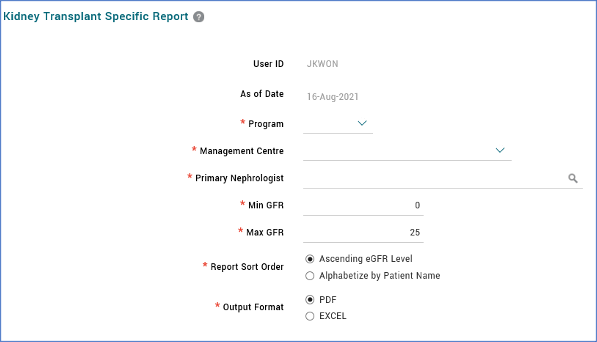
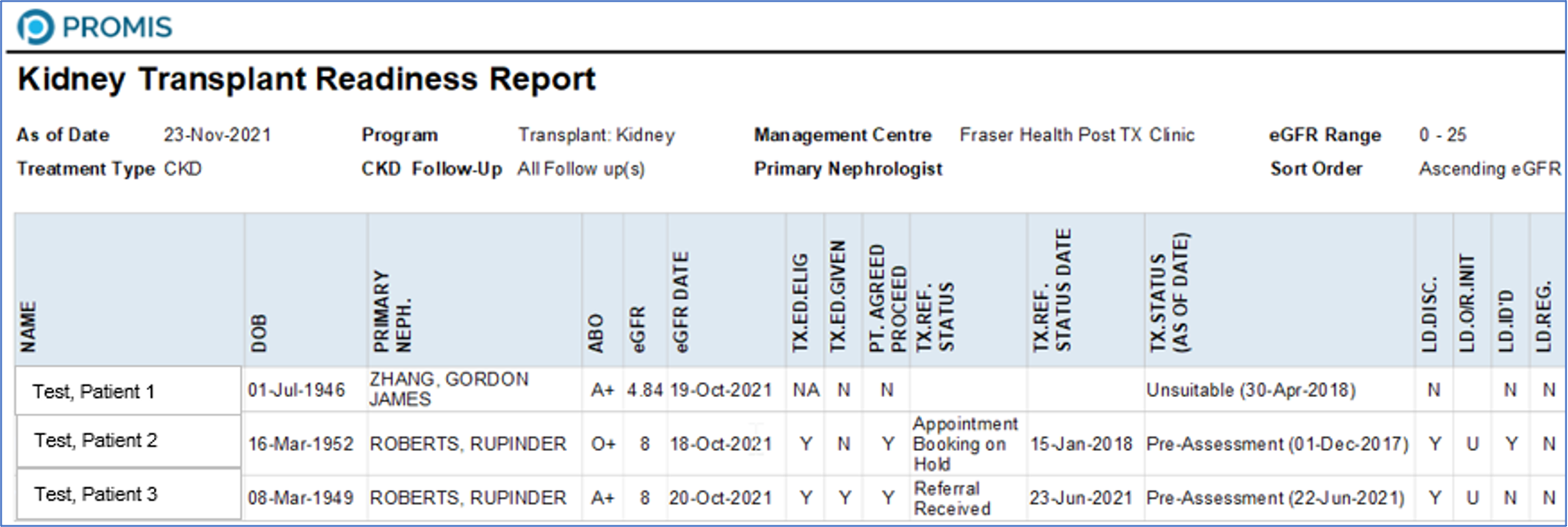
Kidney Transplant Readiness report
(available to view on front-end in February 2022, by request of the Transplant First project)
PROMIS4 > Reports > Center report > KY Transplant Readiness Report
- A Pre-Transplant report provides an easy identification process for patients who are eligible and ready to begin the pre-transplant process. The report provides easy identification of patients who are currently followed up in a centre; the status for the transplant process is one of the columns displayed.
Kidney Transplant Tracking Sheet
(available to view on front-end in February 2022, by request of the Transplant First project)
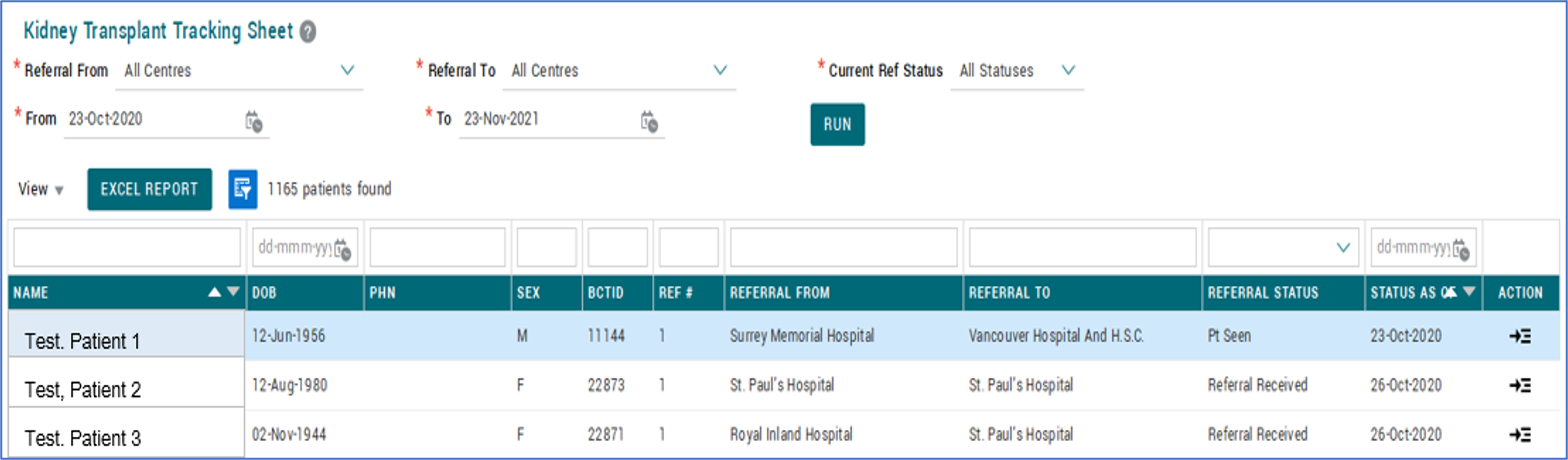
PROMIS 4 > PATIENT LISTS > Transplant > KY Transplant Tracking Sheet
- KCC and BCT practitioners and nurses can view the list of patients who are currently enrolled or prepared for kidney transplant.
- The Tracking Sheet also allows for tracking of the patient’s transplant journey, in a single consolidated view.
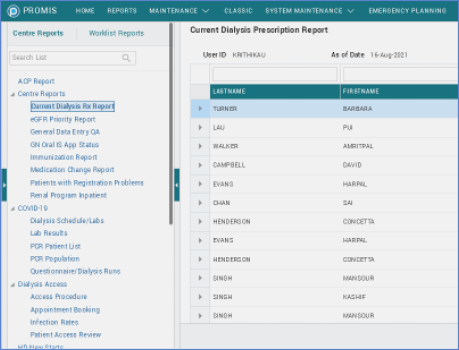
PROMIS4 > Reports > Centre Reports > Centre Reports > Current Dialysis Rx Report
- The Current Dialysis Prescription report allows HD, HHD and PD nurses to retrieve a patient list of all opened and current dialysis prescriptions, for patients and centres to which the User has access.
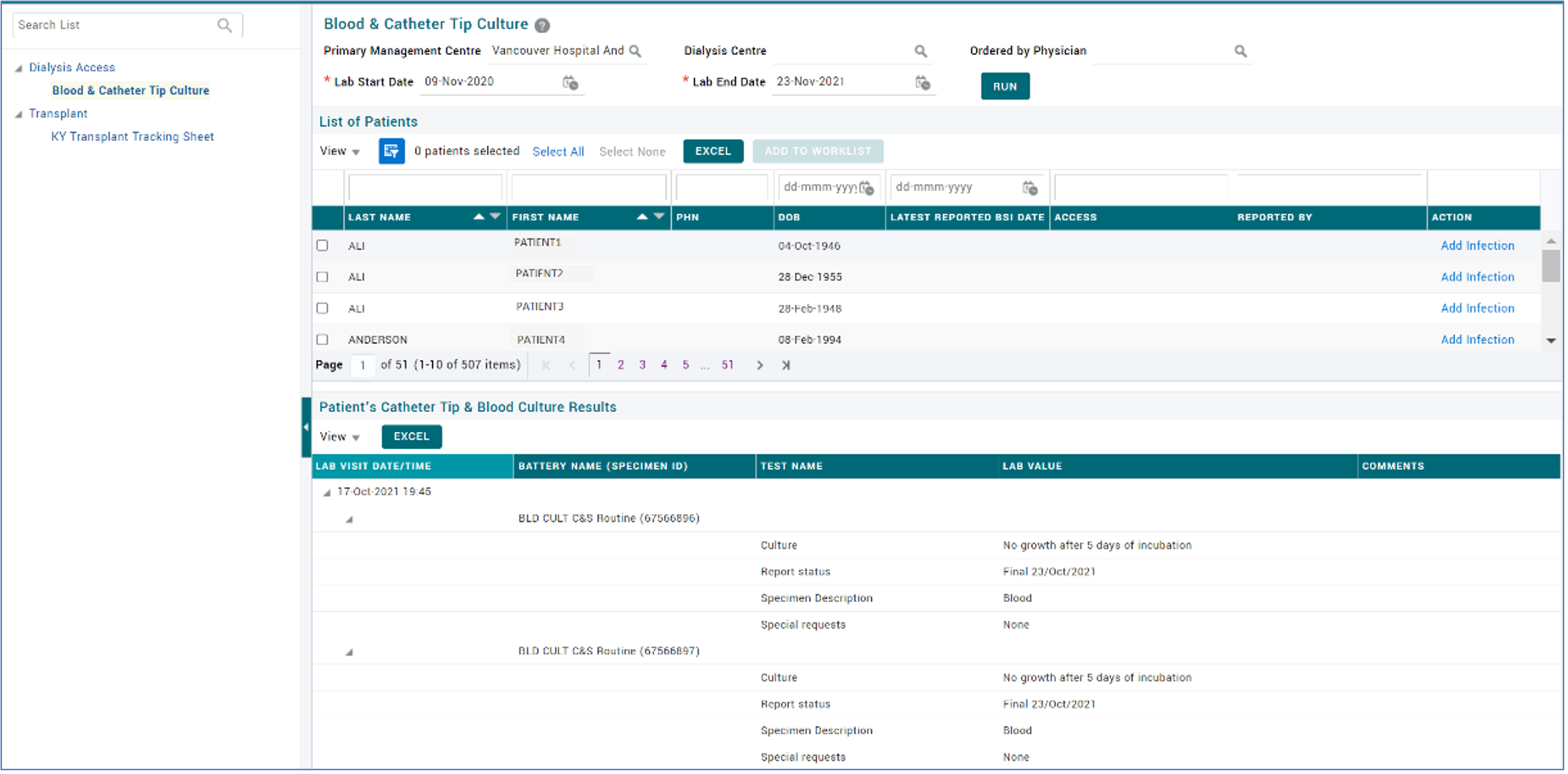
Blood & Catheter Tip Culture Patient List
PROMIS 4 > Patient Lists > Dialysis Access > Blood & Catheter Tip Culture
- The report will display the patients that have catheter tip and/or blood culture results in PROMIS. It allows for easy identification of patients with cultures without needing to check each individual patient record. Note: the report does NOT include lab results that may indicate other infections (i.e. skin infections, etc.).
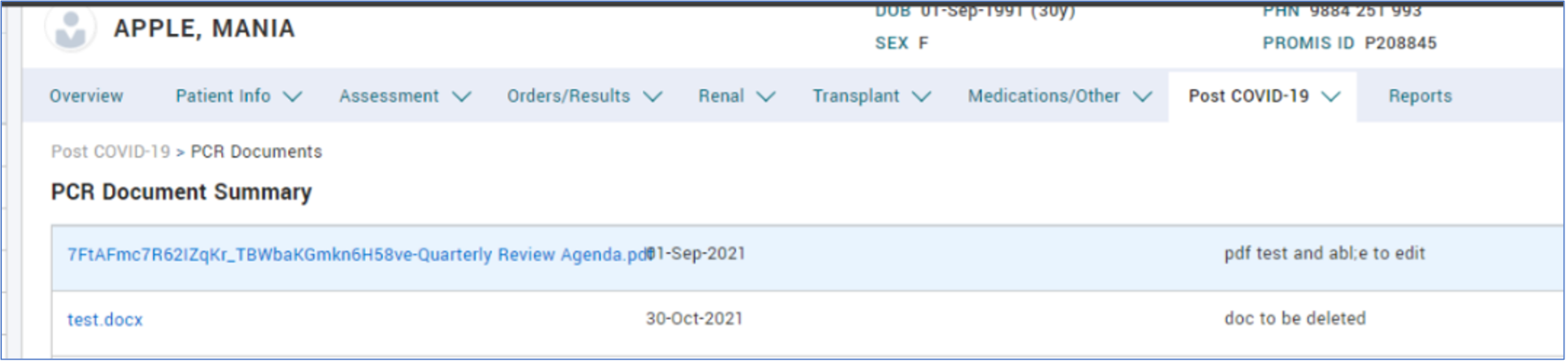
PCR Document Upload
PROMIS 4 > Patient Chart > Post COVID-19 > PCR Documents
- Uploading PCR Documents: PCR documents can be uploaded and viewed from the Post COVID-19 tab. Documents can be uploaded manually or may be uploaded via an interface to PROMIS (where applicable).
Patients List menu
- Patient Lists: Patient Lists can be viewed, searched and navigated through using the Patient List tab on the top navigation bar.

Improvements
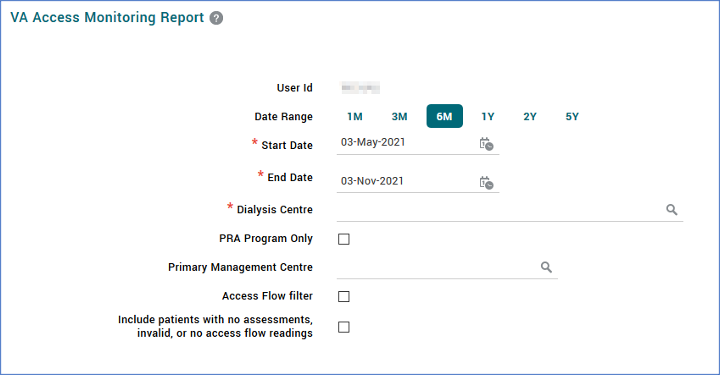
Vascular Access – Access Monitoring Report
PROMIS4 > Reports > Centre Reports > Dialysis Access > VA Access Monitoring
- The VA Access Monitoring report displays the transonic/diascan assessment results for a patient and their centre.
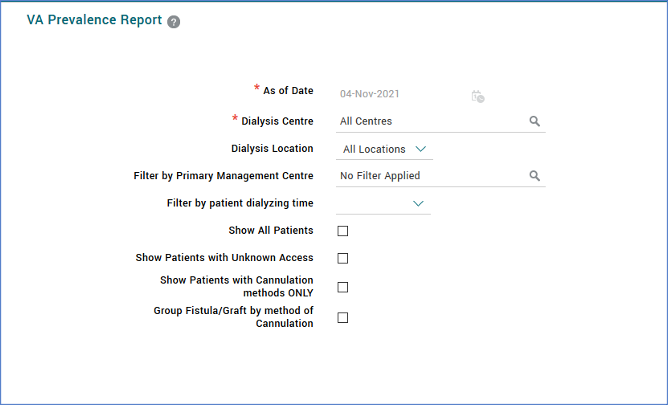
VA Prevalence Report
PROMIS4 > Reports > Centre Reports > Dialysis Access > VA Prevalence Report
- The Vascular Access Prevalence centre report in PROMIS 4 displays the list of active dialysis accesses in use.
eGFR Calculated Values
PROMIS 4 > Reports > Centre Reports (for centre reports)
PROMIS 4 > Worklist report (for worklist reports)
PROMIS 4 > Patient chart > Reports (for a single patient)
- eGFR Priority report format: The eGFR Priority report can be printed in formatted Excel and unformatted Excel (listed as Excel). If printing a report in an unformatted Excel format, no optional data is available for selection.
- eGFR Priority Report dialysis decision is updated with a “Blank” option and changed from drop-down to checkboxes.
Physical Exam
PROMIS 4 > Patient Chart > Assessments > Physical Exam
- SUPPORT-18692 The Physical Examination Summary page includes Provider information, Visit Type, Notes column.
- Blood pressure labels have been updated within the module’s Summary and Overview screens:
- Latest target blood pressure added to header of Patient Chart > Overview > Physical Exam summary widget
- Standing (New) and Lying (Supine) BP columns included
- Sitting BP (formerly named Upright BP)
- Units included in column naming.
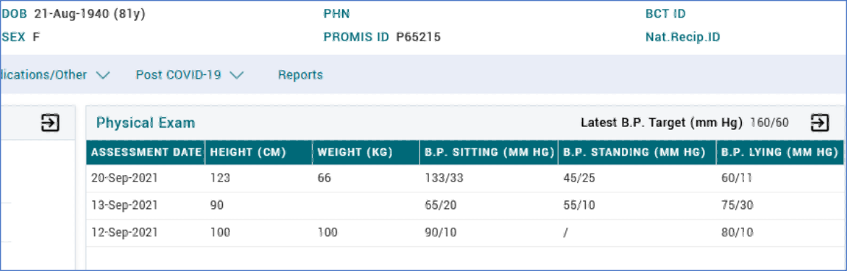
- A Notes icon displays if there is a note entered. Selecting the note icon displays the note along with assessment date/time.

- Blood pressure information updated for Virtual Care to include Home monitoring data or whether the patient was unable to obtain the information.
- Reports and graphs across PROMIS reflect Blood Pressure label updates and as required logic updates:
- Group Monthly Lab review report: Classic > Reports
- Label change: BPU > BP
- Include Standing BP: if all or two/three BPs happen on the same day, the display order will be Sitting > Lying > Standing
- General Data QA report: PROMIS4 > Reports > Centre Reports > Centre Reports > General Data Entry QA
- Include Standing BP: if all or two/three BPs happen on the same day, the display order will be Sitting > Lying > Standing
- FHA Wakeup Report Classic > Renal Care > Reports > FHA Wakeup Report
- Change Label: BP -> BP (Sitting/Lying)
- If Sitting is available, display Sitting, if not then Lying. If both values are available for the same date, then display Sitting.
- Other Reports which include these BP labels are:
- Lab Results Flowsheet
- Lab Requisition Form
- Monthly Result Summary
- Lab Graph
- Transplant Flowsheet
- Glomerulonephritis Flowsheet
- Group Monthly Lab review report: Classic > Reports
Vascular Access
PROMIS 4 > Patient’s Overview > Renal > Dialysis Access
- Additional Vascular Access procedures available when creating a Referral or Consult for a fistula or graft:
- Assessment – Post-Op
- Assessment – Maturation
- Assessment – Pain
- Assessment – Follow-Up
- Next Action button: The “Next Action” button for Procedure will be hidden from the View Referral and View Consult pages if the Procedure type is Post-Op, Maturation, Pain, Follow-up.
- SUPPORT-18373 Arterial resting pressures and Finger PPG’s have been added as dialysis referral and procedure investigations when the selected access is AVF/G.
- SUPPORT-18593 The Awaiting Creation selection has been added to the Add VA Procedure access status list.
- SUPPORT-18593 The Echocardiogram selection has been added to the Add VA Procedure list.
PROMIS 4 > Renal > Dialysis Access > Access Details
- SUPPORT-17028 A Note section has been added to the Add Transfer Set screen in PROMIS 4.
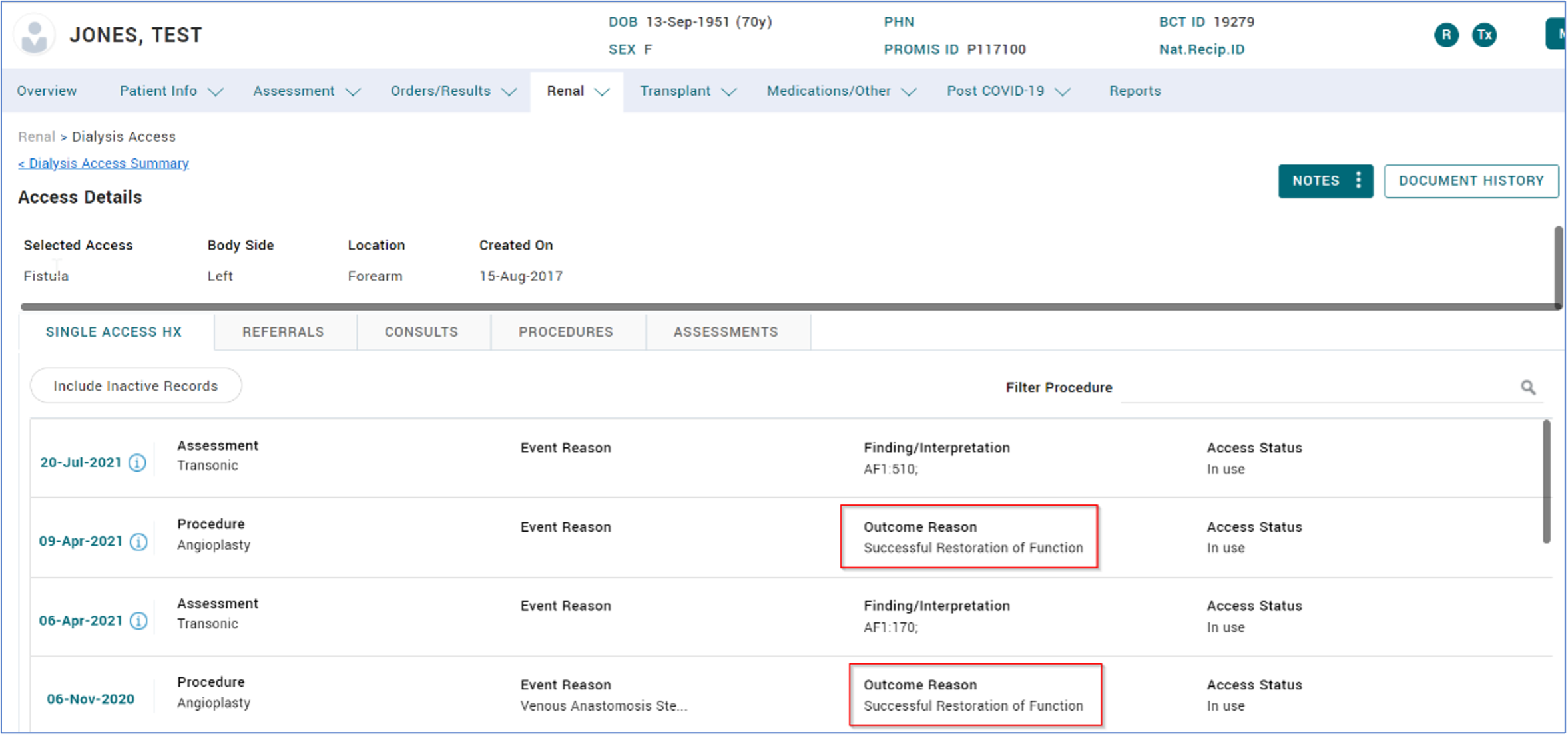
- Single Access Hx: The “Outcome Reason” field from Procedures now displays on the records in the Single Access History tab.
PROMIS 4 > Reports > Dialysis Access > Access Procedure
- SUPPORT-19323 Transposition option has been added to PROMIS in dialysis access procedures.
Post COVID-19 Recovery
PROMIS 4 > Patient Chart > Post COVID-19
- PCR program navigation is grouped in a main Menu with the following sub-menus: Clinic Visits, Questionnaire and Questionnaire Trending.

- Clinic Visits module includes key physical exam data as required by the program, and additionally clinical charting notes found in the Notes column on the Summary page. The note icon displays if there is a written note.
- Clinical visit page layout updated with improved visual design.
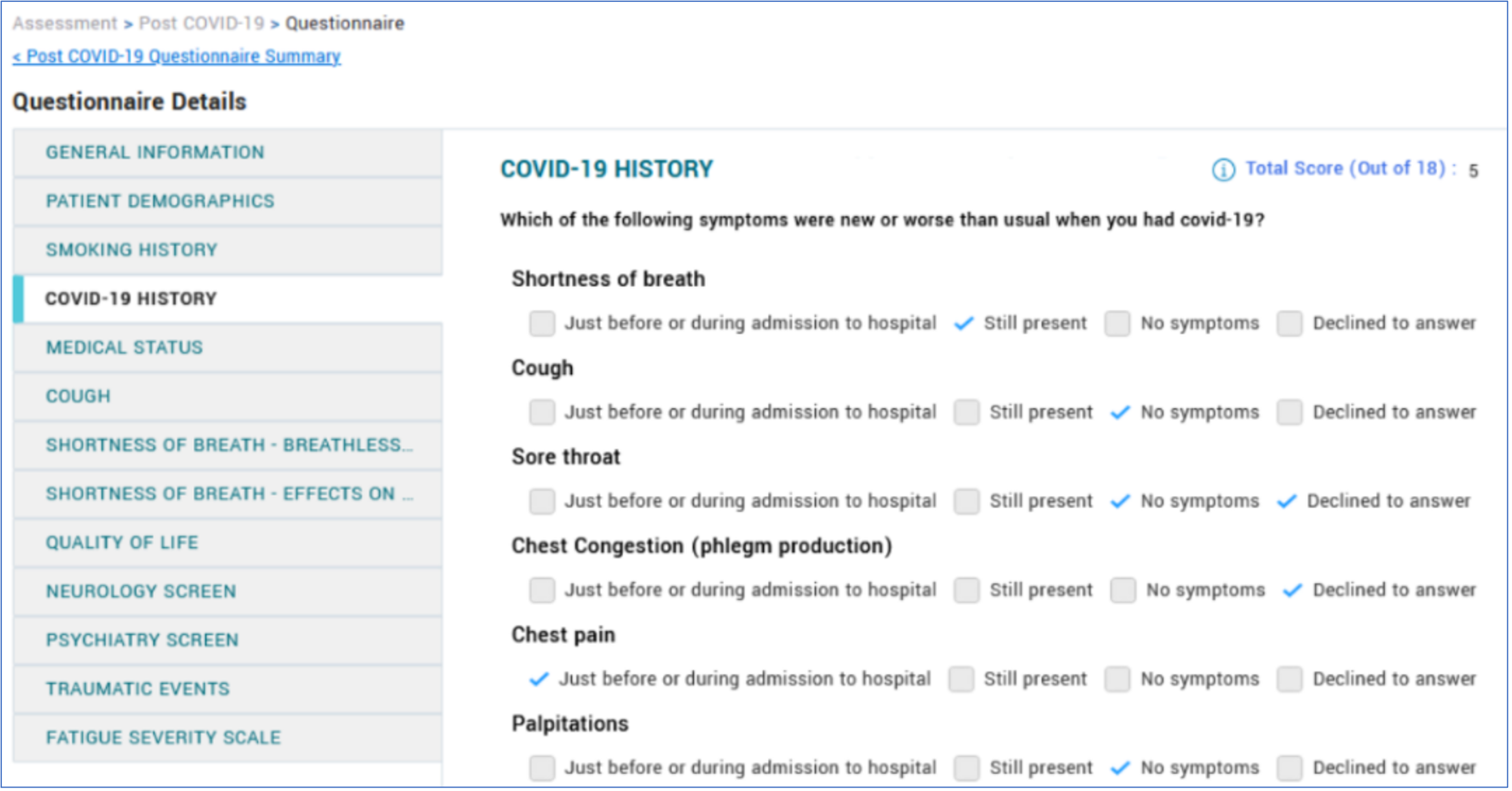
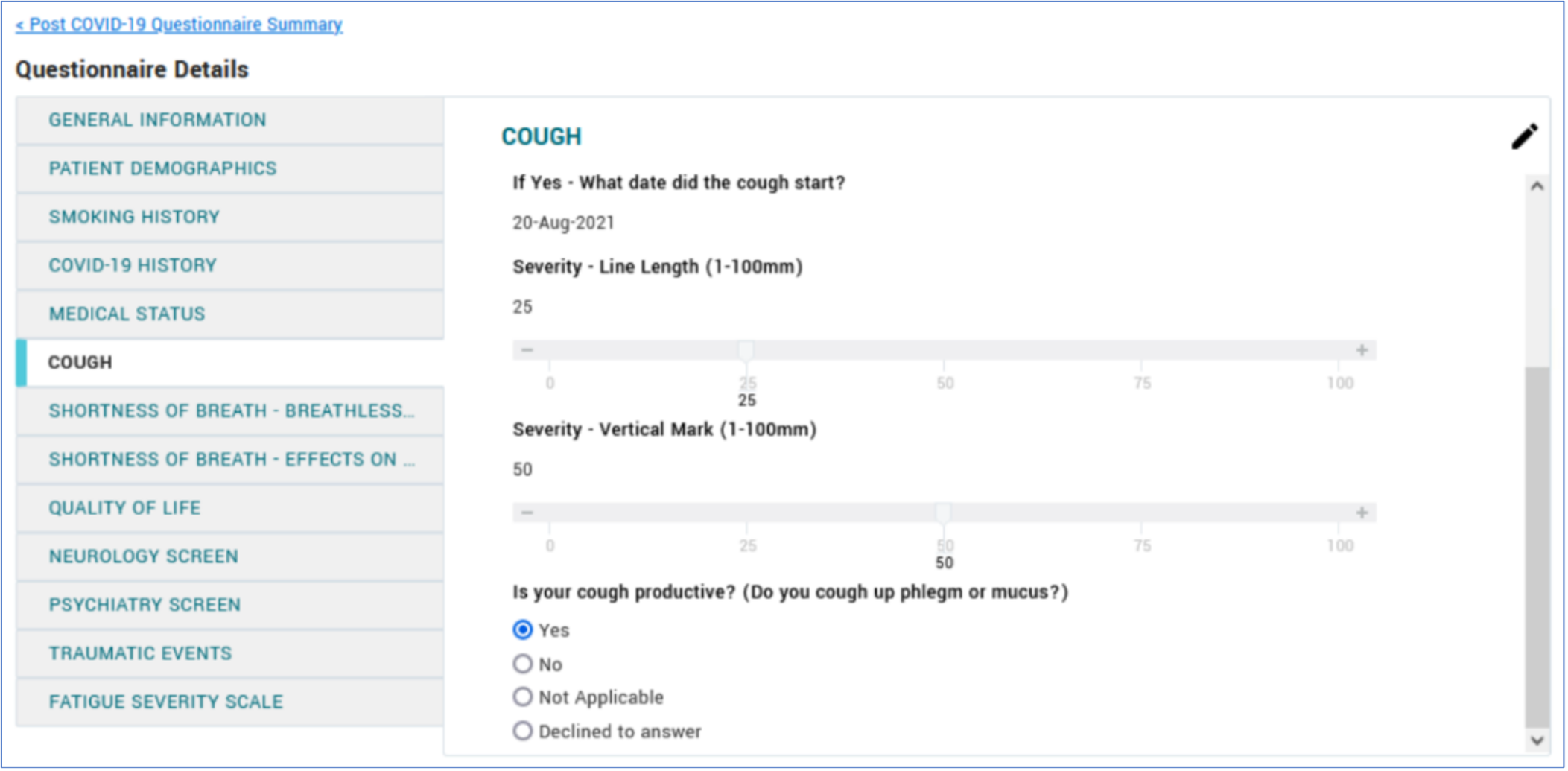
- Questionnaire displays with a number of visual design improvements, to reflect the question and answer layout as in the patient questionnaire pdf version.
PROMIS 4 > Maintenance > PCR Questionnaire Audit
- Audit module no longer includes error “Follow-up without Baseline”.
- Audit module displays a total of 15 rows, under the section List of Patients with Unprocessed Questionnaires.
PCR Patient List Report
PROMIS 4 > Centre Report > PCR Patient List Report
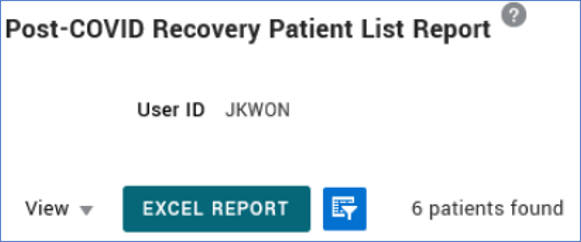
- PCR Patient List Report includes total number of patients based on report parameters (number displays next to the filter icon).
PCR Population Report
- PCR reports: All referrals are counted in the PCR reported numbers, except for when the deactivation reason is “Referral Declined”.
Other PCR Updates
- Immunization centre report: PCR is an option in the Treatment Type parameter of the Immunization report.
- SUPPORT-18464 Additional Management Centres: PCR Central Triage, PCR Interior Health, and PCR Education Stream are available as centres for registering patient into the Post COVID-19 Recovery program.
- SPH PCR clinic interfaces with Cerner CST: patient’s registration in SPH Cerner, with the PROMIS flag activated, will interface into PROMIS. (went live in PROMIS November 1st, 2021)
Deceased Donor Attachments
Classic > Transplant > Donor > Deceased Donor Attachments
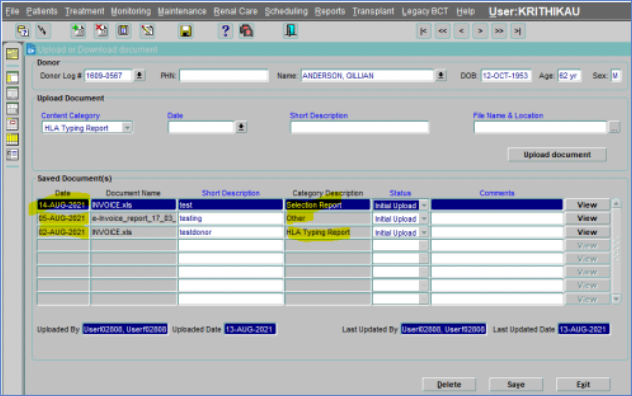
- When populating a Selection Report, manually select content category as ‘HLA Typing Report’. This category is mostly used by VGH Immunology Lab. Older attachments entered in this category will continue to be visible with Content Category as ‘Immunology Report’.
- When a Deceased Donor is registered in CTR and an attachment is uploaded in the Deceased Donor Attachments form in Classic, PROMIS will send the latest attachment to CTR. The File name shall be sent as ‘Documentname_Upload date’
Kidney Referral Form (Transplant First Project updates)
Classic > Transplant > Kidney Referral > Kidney Referral Form
- Kidney Transplant Referral Form Comorbidities section: The completion of Transplant comorbidities is not required for submission. The Check Mandatory button is removed.
- Note: Comorbidities remain a renal Essential Data Element in PROMIS and should be entered when known. However, the submission of a transplant referral is no longer held up pending data entry.
PROMIS 4 > Renal > Modality selection > Treatment Option > Potential Candidate for Transplant > “No” reasons list
- “Early Loss (Multiple Transplant)” removed from the Reason list under Potential Candidate for Transplant. The historical records with “Early Loss” selected will continue to display.
- Potential Candidate for Transplant reason list is the same as Classic Kidney Transplant Referral > Absolute Contraindication tab list.
- Kidney transplant referral forms can be submitted when the following values are selected ‘unknown’. This is to make the referral submission process faster so that a patient can be reviewed by the pre-Transplant team in urgent kidney referral processes.
- Unknown “U” as an option for Prior Pregnancies.
- When the user selects ‘Unknown’ for:
- Previous Blood Transfusions
- Prior Pregnancies
- A prompted message appears when moving to the next tab:
- “Please follow up with the patient on previous pregnancies”
- “Please follow up with the patient on previous Blood Transfusions”.
- Mandatory Lab Test updated in the Kidney Transplant Referral Lab, Virology section:
- Removed the following non-mandatory Lab tests from the list: ‘PSA’ & ‘Glucose, Fasting’.
- Removed the text notation on the form “Lab Tests prior to Epstein Barr Virus are Mandatory”.
- Removed the text notation on the form “For Male >40 yrs old: PSA is mandatory”.
- Changed the text notation on the form “All the required virology tests between Epstein Barr Virus and Rapid Plasma Reagin have been ordered” to “All required tests have been ordered.“
- Below the text notation of “Lab Results are valid for 365 days”, the text description has been added: “At least one HIV test result (HIV, HIV_AGAB, HIV 1_0_2) is required for the referral submission.”
- Other Tests to submit the referral are updated.
- “Bypass to Expedite” status added to indicate that the test is not needed to submit the referral, for special cases.
- Chest x-ray (Within 6 months) and EKG (Within 6 months) for All Patients:
- Able to submit the referral if Order Status is:
- Not required
- Test Done – Copy
- Test Done – Attached
- Able to submit the referral if Order Status is:
- TB Screen (IGRA preferred) – Updated description to Chest X-ray, EKG, TB – for All Patients:
- Able to submit the referral if Order Status is:
- Not required
- Test Done – Copy
- Test Done – Attached
- Bypass to expedite
- Able to submit the referral if Order Status is:
- Mammogram – Update on the Other Tests description table: “Females age 50-74 as per BC Cancer’s Breast Screening Program.”
- Able to submit the referral if Order Status is:
- Chest x-ray (Within 6 months) and EKG (Within 6 months) for All Patients:
- Not required
- Test Done – Copy
- Test Done – Attached
- Bypass to expedite
- Pap Smear – Update on the Other Tests description table: “Females age 25-69 as per the BC Cancer’s Cervical cancer Screening Program.”
- Able to submit the referral if Order Status is:
- Not required
- Test Done – Copy
- Test Done – Attached
- Bypass to expedite
- ECHO – Update on the Other Tests description table: “ECHO (Within 1 year); All patients >= 40”
- Able to submit the referral if Order Status is
- Not required
- Test Done – Copy
- Test Done – Attached
- Bypass to expedite
- “SPEP (One time)” (Serum Protein Electrophoresis) for All patients >= 50, new test added to Other Tests.
- Able to submit the referral if Order Status is:
- Not required
- Test Done – Copy
- Test Done – Attached
- Bypass to expedite
- “FIT (Valid 2 years)” new test added to Other Tests.
- “Coronary Angiography” new test added to Other Tests.
Labs
PROMIS 4 > Patient Overview > Orders/Results > Labs
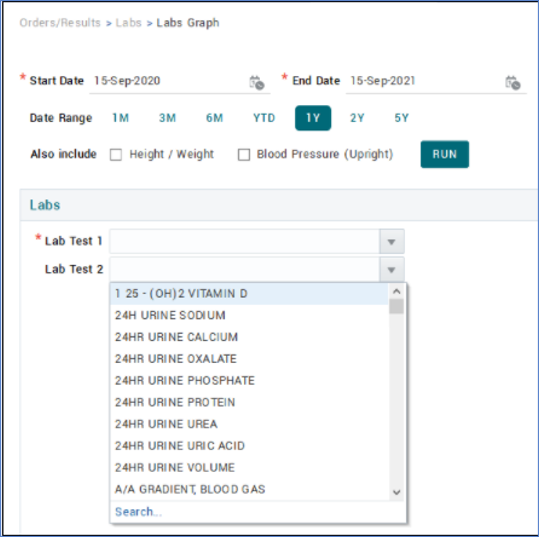
- A scroll bar has been added to the Lab Test 2 drop-down menu in Labs Graph.
Moved from Classic to PROMIS 4
Resolved Issues
PCR
PROMIS 4 > Patient Overview> Post COVID-19
- Questionnaire Trending graph displays full graph when Worklist and Patient panels are expanded.
PROMIS 4 > Patient’s Overview > Patient Info > Deactivation
- The PCR selection on the Deactivate button is enabled only for patients who are actively enrolled in Post COVID-19 Recovery program.
PCR Population report
- Reflects accepted and declined referrals based on the centre selected to run the report.
- If a referral is added then later declined in the same month, this is reflected in both the accepted and declined referral count.
- Breakdown section count for accepted and declined referrals is consistent between referral and breakdown sections of report for scenarios where patient is activated then deactivated.
- Breakdown section: removed the text “over last 12 months”.
Diagnostic Results
PROMIS 4 > Order/Results > Diagnostic Results
- Sit to Stand Test results will not display the “Score” field in Add/Edit and View as well as the Summary page, by request.
- Sit to Stand Test: updated for consistency in spelling.
- Pulmonary Function values for TLC (L) and RV (L) display expected decimal points in edit view.
- 6 Minute Walk Test: updated for consistency in spelling in Summary page result filter.
Labs
PROMIS 4 > Patient’s Overview > Order/Results > Labs
- The eGFR is no longer automatically calculated by physical examination results.
- The eGFR is updated accordingly when a physical examination result is deleted.
- SUPPORT-17514: The Labs Graph tabs shows trends for selected lab tests within the start and end dates inclusively.
- The Labs Graph layout and results displays concatenated results and is consistent across other graphs.
Dialysis Access
PROMIS 4 > Patient’s Overview > Renal > Dialysis Access
- VA Consult: Previously linked referrals are now visible and displayed in the Edit tab on the Consult Summary page.
- Dialysis Access: Physician search layout is consistent across all physician screens.
- The Add VA Referral screen is consistent with the hospital search screen.
- Add Referral: the ordering of Procedure and Procedure Type is consistent.
Dialysis Prescriptions
PROMIS 4 > Patient’s Overview > Renal > Dialysis Prescriptions
- Error messages are updated for clarity when adding prescriptions.
- Add PD Prescription: the fill volume error message is updated for clarity.
- The layout of screens for adding new Referrals and Procedures is consistent across prescription types.
- HD/HHD Prescription start dates: an HD/HHD prescription can have a future start date, but overlapping of an end date of one prescription with the start date of another is not allowed.
Physical Examination
PROMIS 4 > Patient’s Overview > Assessments > Physical Examination
- The Physical Exam screen displays when users click on the related tab while in the Dialysis Access module.
- The height and weight values are consistent with the diagnostic results of the 6 Minute Walk test.
eGFR Priority report
PROMIS 4 > Reports > Centre Reports (for centre reports)
PROMIS 4 > Worklist report (for worklist reports)
PROMIS 4 > Patient chart > Reports (for a single patient)
- SUPPORT-15655 / SUPPORT-17513 eGFR Priority Report will display lab values with “<” or “>”.
- eGFR Priority Report displays an error message when a negative number is entered in the “Min GFR” or “Max GFR” field.
- VA Access Procedure report: the sorting order for Date of Birth, Procedure Date, and Event Date is functional. Note: The entire row will require to be highlighted to sort properly.
- SUPPORT-19388 VA Infection Rates report: The “Show Patients with Infections ONLY” check box can now be checked individually.
- The Access Monitoring report and the Infection Rates report are now labelled as the VA Access Monitoring report and the VA Infection Rates report respectively.
- The VA Infection Rates report is generated without any errors.
- The VA Infection Rates report is generated without any errors if the checkbox “Show patients with infections only” is checked in the parameters page.
- SUPPORT-19017: Patient Access Review report: Patient information is displayed on top of each page if the information extends to multiple pages for the report.
- Locations on the PD Assist Wait Times Report will be listed alphabetically.
Overview & Widgets
PROMIS 4 > Patient’s Overview > Overview tab
- SUPPORT-17252 Infectious Status widget: The latest EBV and CMV serology results, within last 2 years are displaying correctly in the Infectious Status widget on the Patient Overview page.
- SUPPORT-19766 When opening PROMIS Classic through PROMIS 4, the PROMIS 4 tab remains on current page instead of redirecting to the Home page.
SUPPORT-17787 Renal Program Inpatient Report: Current admitted patients will display on “Admission List” report if a patient is a post-transplant patient or a patient’s current hospitalization record has “TX Adm” checked.