
Release Date: February 26, 2023
New Features
- HD Catheter Reason Incidence Report
- Transplant Vaccination Status
- HHD Assessment: Adding Water Sample
- Willing to Cross Values Received
Classic to PROMIS 4
Improvements
- Hazardous Drugs in Medication Profile Report
- HD New Starts
- VA Incidence Report
- HD Catheter Reason Prevalence Report
- Emergency Planning
- Kidney Transplant Referral Status Report
- Kidney Referral
- Document History
- Hospitalizations: Transplant Admission Checkbox
- Yukon Management Centre
- Post-COVID Recovery Management – Centre: Provincial PCR Clinic
- Post-COVID Recovery – Registration Referral
Resolved Issues
- Admission Registered Report (Hospitalizations)
- Biopsy
- Kidney Transplant Flowsheet
- Acuity Level HD – Unit Review Report
- Patient Diagnostics
- Living Donor Follow-Up Letter – Fax # Update
- Post-COVID Recovery Patient List Report
Further details can be found in the PROMIS User Guide:
*Training Document links noted below, marked alongside release note for selected training updates on the PROMIS Training portal page.
New Features
HD Catheter Reason Incidence Report
Training Document Link:
PROMIS 4 > Reports > Dialysis Access > HD Catheter Reason Incidence Report
- The HD Catheter Reason Incidence Report identifies the number and percentage of patients starting HD with a catheter during a selected period, categorized in a short-term or long-term catheter reason.
- Upon selecting the option ‘Show Patient List’ on the parameter screen, the list of patients will display on the report after the statistical section.
Transplant Vaccination Status
Training Document Link:
PROMIS 4 > Patient Lists > Transplant > Transplant Vaccination Status
- Transplant Vaccination Status displays a list of patients belonging to selected transplant programs, that are missing the required or recommended vaccinations. Once the patient list is run, it can also be exported as an excel report.
- A button for Mapped Vaccines provides a list of vaccines that are mapped to a particular vaccine name in PROMIS.
- A button for Unmapped Vaccines provides a list of vaccine codes that are currently not mapped to any parent (group) mapping in PROMIS.
- Adding a new vaccine to the list or adding to a group mapping is provided by PROMIS Support.
HHD Assessment: Adding Water Sample
Training Document Link:
https://promis.testing.canadian-visa-lawyer.com/wp-content/uploads/2023/02/HHDWaterSource_Final.pdf
PROMIS 4 > Patient Overview > Demographics > Edit > Home Address
- A patient’s water source field added to Demographics > Home Address when they are dialyzing at home.
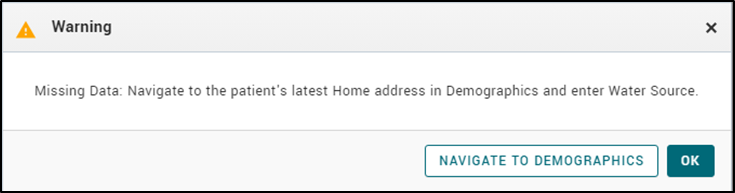
- Upon adding a new HHD Prescription and clicking Save, a warning message appears and provides an option to navigate to Demographics screen, to enter the Water Source. The same message will also display in the Dialysis Status module when saving HHD as the patient’s dialysis status. Clicking on the Navigate to Demographics button brings up the Demographics module and in editing the Water Source, the list has either Municipal or Well water options.
- The Water Source in Demographics is mandatory for all HHD patients when their Dialysis Status indicates the patient’s dialysis location = ‘Home’.
PROMIS > Emergency Planning > Renal Patients List
- In Emergency Planning under Renal Patients List, when viewing or creating a newly saved emergency list for HHD patients, the water source data will display for each HHD patient. The column will display after the City field, for all active and past HHD Emergency Planning Patient Lists.

Willing to Cross Values Received
Training Document Link:
https://promis.testing.canadian-visa-lawyer.com/wp-content/uploads/2023/02/WillingToCross_FINAL.pdf
PROMIS 4 >Patient Overview > Transplant > Recipient Immunology / Immunology Report
- Willing to Cross values will be received in PROMIS in the Recipient Immunology screen and displayed under Allele-specific. Note: The Willing to Cross values will have no impact on offering or matching calculations.
- In the Immunology Report, found on the Recipient Immunology screen, the report displays the Willing to Cross values below the Allele Specific section.
Classic to PROMIS 4
Clinical Trials/Studies
Training Document Link:
https://promis.testing.canadian-visa-lawyer.com/wp-content/uploads/2023/02/ClinicalTrials_FINAL-.pdf
PROMIS 4 > Patient Overview > Clinical Trials/Studies
- Clinical Trials/Studies displays a summary of trials/studies a patient has been enrolled in, along with information related to the trial/study, added comments, the entered enrollment and exit dates. Studies are added to the patient’s records or saved records can be edited.
Clinical Trials/Studies Report
PROMIS 4 > Reports > Centre Reports > Clinical Trials/Studies Report
- The Clinical Trials/Studies report pulls patients on a selected study and by management centre. The report displays an enrollment list and description of the study, and provides detail for each patient’s record, displaying any notes entered into the patient’s comment field for that study.
Improvements
Hazardous Drugs in Medication Profile Report
PROMIS 4 > Reports > Worklist Report > Medication Profile / PROMIS 4 > Patient chart > Reports > Medication Profile
Classic > Monitoring > Medications > Medication Profile / Classic > Reports > Medications > Medication Profile
- SUPPORT-29398 Hazardous drug indications are viewable on the medication report, with a Hazard column to the right of the Drug Name column, when reviewing a patient’s current medications.
HD Prescription Extract from Cerner
Training Document Link:
PROMIS 4 > Patient Select > Renal > Dialysis Prescriptions
- HD Prescriptions recorded in CST Cerner for VPP adult sites (VGH & SPH In Center and CDU’s) are now displayed in PROMIS under Dialysis Prescriptions. Autoloaded label will appear next to autoloaded records and an Autoload Notes section will also have information populated from Cerner. For further details and frequently asked questions on this change please view – CST Cerner HD Prescriptions displayed in PROMIS – FAQ.
HD New Starts
PROMIS 4 > Report -> Centre report -> HD New Starts
- SUPPORT-29379 BC Children’s Hospital is included in the HD New Starts patient list as a management centre.
VA Incidence Report
PROMIS 4 > Reports > Dialysis Access > VA Incidence Report
- SUPPORT-29695, SUPPORT-28882 Chronic HD patients that have any ‘In Use’ access status added in the VA module with the same date as their chronic HD start day or +/- 1 day of their chronic HD start date, will not display as incomplete accesses in the report.
HD Catheter Reason Prevalence Report
PROMIS 4 > Reports > HD Catheter Reason Prevalence Report
- The HD Catheter Reason Prevalence report displays the total number of patients with Long-Term Catheter Reasons and Short-Term Catheter Reasons.
Emergency Planning
Training Document Link:
PROMIS 4 > Emergency Planning > Renal Patients List
- Primary Emergency Planning users can delete an active or past emergency patient list, that was entered in error.
- The details of an emergency list can be edited. All users with access to Emergency Planning can edit the start date, emergency reason, and list name of an active Emergency Planning patient list.
PROMIS 4 > Emergency Planning > HD Facility Report
- The Emergency Planning ‘Facility Report’ is renamed as ‘HD Facility Report’.
- SUPPORT-24692, SUPPORT-14220 The HD Facility Report has improved readability for the facility report. On the Facility information (left-side), the Patient Count has been replaced with more detailed ‘Typical Occupancy’ and ‘Surge Occupancy’. Count breakdown details have been added and also in display under the ‘Details for Current Week’. The legend on the screen has been updated to reflect the detail added and explanation of different sections.
Kidney Transplant Referral Status Report
PROMIS 4 > Patient Lists > Transplant > KY Transplant Referral Status
- SUPPORT-27915 In the Kidney Transplant Referral Status parameter screen, an additional filter of ‘Treatment Type’ enables filtering the report for patient modality (CKD, HD, HHD, PD).
Kidney Referral
PROMIS 4 > Patient Select > Transplant > Referrals > Kidney > Kidney Referral Summary > Mandatory Tests
- In the Kidney Referral mandatory tests, the TB screen test name has been updated from ‘TB Screen (TB Skin Test or IGRA)’ to ‘TB Screen (Questionnaire, IGRA, CXR)’.
Document History
Training Document Link:
PROMIS 4 > Patient Select > Documents > Document History
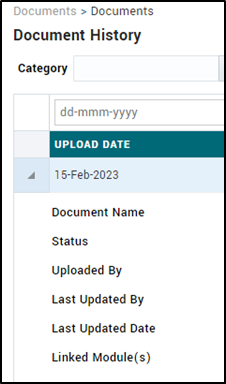
- Document upload and delete from individual modules is removed (modules of ACP, TB, PCR). The function of uploading or deleting is only available in Document History.
- In Document History, upon expanding the row of a document file, the ability to identify the linked module(s) that the document is linked to on the Document History Summary page.
Hospitalizations: Transplant Admission Checkbox
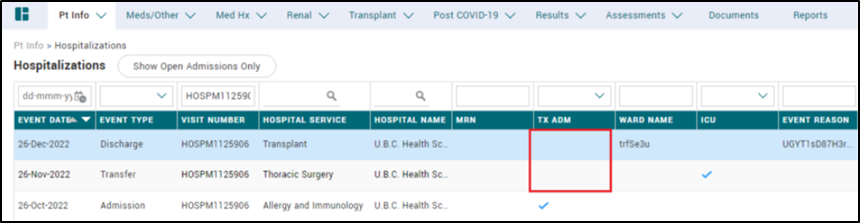
PROMIS 4 > Patient Select > Patient Info > Hospitalizations
- SUPPORT-26290 A transplant admission checkmark is indicated on the Admission entry. All hospitalization events related to a transplant admission can be identified through the checkbox in the associated Admission event.
Yukon Management Centre
- Two new management centres created: Yukon Pre-Dialysis Clinic and Yukon Dialysis Clinic. Patients in PROMIS are registered in the PRA program with their primary management centre as SPH, and the Yukon management centres can be added as second management centre.
Post-COVID Recovery – Centre
- New PCR management centre available, titled the ‘Provincial PCR Clinic’.
Post-COVID Recovery – Registration Referral
PROMIS 4 > Patient Select > Pt Info > Program Registration > PCR program > Referral
- Under the Program Registration for PCR program, under the Referral section, the ‘Consent to Biobank’ is renamed to ‘Consent to be contacted for Research’.
Resolved Issues
Admission Registered Report (Hospitalizations)
PROMIS 4 > Reports > Centre Reports > Transplant > Recipient > Admission Registered
- SUPPORT-25584 Admission Registered Report is generating the list of patients accurately.
Biopsy
PROMIS 4 > Results > Biopsy
- SUPPORT-28054 The Biopsy form free text boxes character limits increased: Comments field increased from 1,000 to 3,000 character limit.
- SUPPORT-28475 Primary biopsy results can be entered directly on the biopsy form, upon selecting Add or Edit.
Kidney Transplant Flowsheet
PROMIS 4 > Reports > Worklist Reports > Transplant > Transplant Flowsheet
- SUPPORT-29325 In the Kidney Transplant Flowsheet, the ‘NTPROBNP’ lab name and value is replaced with ‘JC PCR’.
Acuity Level HD – Unit Review Report
PROMIS 4 > Reports > Centre Reports > Acuity Level HD – Unit Review
- SUPPORT-27632 All patients with an acuity assessment appear on the Acuity Report. East Vancouver Community Dialysis Unit acuity report corrected.