
Release Date: November 19, 2023
New features
Classic to PROMIS 4
Improvements
- HHD Prescription from CST Cerner – Dialysis Prescription (NxStage Rx)
- HD Catheter Reason Prevalence Report
- VA Prevalence Report
- Current Dialysis Prescription Report
- Emergency Management Plan Activation
- Demographics: Water Source
- ESAS: character limit
- Living Donor Follow-Up & Report (Classic – increased field entry)
- Liver Recipient Flowsheet: HAV Total
- Transplant Donor
Resolved Issues
- KY Transplant Readiness Report
- Dialysis Access
- Dialysis Status: Summary / Renal Facesheet
- Dialysis Scheduling
- Patient Monthly Result Report
- Physician Billing Report
Further details can be found in the PROMIS User Guide:
New features
Schedule Reporting
Training Document Link:
Set an automated schedule to run a report for a specific date and time. A button on the bottom of three report parameter pages have a button to “Schedule Report”. The reports available to set a schedule are:
- Admission Registered
- Medication Prescription
- eGFR Priority Report
PROMIS 4 > Reports > Select parameters > Select the time
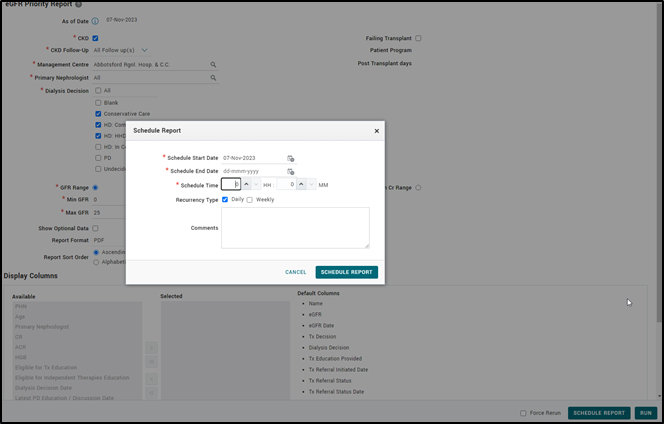
PROMIS 4 > Reports > Reports Schedule
- Scheduled reports are listed and viewed with start dates and time under Reports > Reports Schedule > Scheduled Reports tab.
- Comments can be added to the daily and weekly scheduled reports tab summary screen to assist in distinguishing between the same reports.
- Generated reports run from a scheduled time can be accessed under Reports > Reports Schedule > Generated Reports tab
TB Screening Tracking Report
Training Document Link: https://promis.testing.canadian-visa-lawyer.com/wp-content/uploads/2023/11/PROMIS-4.20-TB-Screening-Tracking-Report-FINAL.pdf
PROMIS 4 > Reports > Centre\Worklist Reports > Centre Reports > TB Screening Tracking Report
- SUPPORT-15410 TB Screening Tracking report identifies new HD/PD patients who started as chronic dialysis and have not had their TB screening fully completed.
Classic to PROMIS 4
Medications
Training Document Link: https://promis.testing.canadian-visa-lawyer.com/wp-content/uploads/2023/11/PROMIS-4.20-MedicationsMedReports.pdf
PROMIS 4 > Patient Select > Meds/Other > Medications
Medications have moved to PROMIS 4, with the same ability to view, enter new and edit, copy, discontinue, and cancel. All patient medication information (current and historical) has been moved to PROMIS 4.
- The summary tab in the medications screen displays the full description of the medication information including the dose type.
- Minimum and maximum dose fields in the dose table can accept the value of zero.
- Depending upon the dose type selected, ability to add several rows using the + button along with an option to delete text in event of an error.

- Discontinue and copy button provides the ability to discontinue, and without losing focus on the record, it is automatically copied allowing edits on the record as a new medication.
- Once records are saved, the summary view will sort-order by medications start date.
- Viewing records in summary history, selecting the ‘Include cancelled records’, cancelled records will display in red.
- Discontinued medications can be verified.
- When a patient has more than 25 medications, the ‘load more’ feature enables the system to load the next 25 records.
- Adding notes to a medication entry is enabled.
- Removal of leading zeroes for the drug % in Patient Panel. (Example 99.0100% now reads 99.01%)
- The auto search feature is enabled after typing a minimum of two characters.
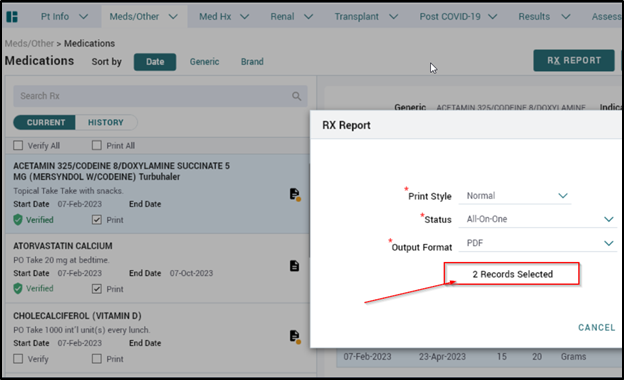
- Selecting a patient’s records using the print option from the list of medications in the current medications, then clicking on RX Report will open the on-screen parameters to display the number of records selected for printing.
Medication Reconciliation
Training Document Link: https://promis.testing.canadian-visa-lawyer.com/wp-content/uploads/2023/11/PROMIS-4.20-MedicationReconciliation.pdf
PROMIS 4 > Patient Select > Meds/Other > Medication Reconciliation
Medication reconciliation presents a list of all medication reconciliations completed for a patient.
- A summary view of a patient’s medication reconciliation records are available. New reconciliations can be added from the Reconciliation Summary.
- An additional list of values (LOV) option has been added to the drop-down menu in the medication reconciliation screen.
- HD -> Nocturnal HD
- Nocturnal HD -> HD
Medication and Reconciliation Reports
Training Document Link: https://promis.testing.canadian-visa-lawyer.com/wp-content/uploads/2023/11/PROMIS-4.20-MedicationsMedReports.pdf
PROMIS 4 > Reports > Centre or Worklist Reports > Worklist Reports > Medication
PROMIS 4 > Patient Select > Reports > Medications
The medication and reconciliation reports can be run in two ways: as a single-patient report or with a worklist. The following reports marked with a * below are also available to run directly from the Medications Summary.
- The following reports have moved to PROMIS 4:
- Antibiotic Usage
- Community Pharmacy Discrepancy *
- HD Medication Reconciliation Summary Report
- Medication Change Report
- Medication Prescription
- Medication Profile *
- Medication Reconciliation *
- Medication Verification
- My Medications *
- Patients Due for Medication Reconciliation Report
Medication Prescription Report
PROMIS 4 > Patient Select > Report > Medications > Medication Prescription
- There is a page break between Formulary and non-Formulary medications
- The patient’s Prescription report is printable without any medications entered.
Medication Reconciliation Report > Clinic Medication Orders
PROMIS > Patient Select > Reports > Medications > Medications Reconciliation
- Upon selecting the Medication Reconciliation report and on the parameter screen, selecting the Report Type = Clinic Medication Orders, the resulting report has a notation near the top of the page to ensure this information is not missed by pharmacists.

- SUPPORT-18928 Medication Reconciliation report has a new parameter ‘Status’, used to filter the Formulary and non-Formulary drugs. The report also indicates the hazardous group for the drug.
Medication Verification Report
PROMIS > Patient Select > Reports > Medications > Medication Verification
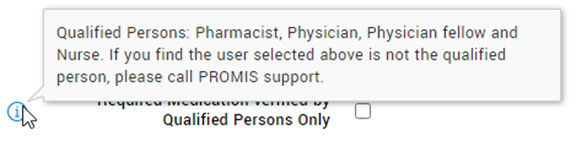
- Medication Verification report parameter screen captures tool-tip message that lists qualified persons and to contact PROMIS Support if qualified person is missing from list.
Patients Due for Medication Reconciliation Report
PROMIS 4 > Reports > Centre/Worklist Reports > Worklist Reports > Medication > Patients Due for Medical Reconciliation Report
- SUPPORT-29706 Penticton Integrated added to the primary management centre selection under CKD in the report Patients Due for Medical Reconciliation.
Improvements
Modality Selection: Capture Referrals to Home Therapies
Training Document Link: https://promis.testing.canadian-visa-lawyer.com/wp-content/uploads/2023/11/PROMIS-4.20-ModalitySelection-FINAL.pdf
PROMIS 4 > Patient Select > Renal > Modality Selection
- Capture and identify patients in Modality Selection, who are referred to an independent therapy program to start the transition into home therapy.
Dialysis Access
PROMIS 4 > Patient Select > Renal > Dialysis Access
- SUPPORT-21948 Patients who are treated for an infection outside of the province, their antibiotics information can be updated by selecting “Other” or “Unknown” for the ‘Prescribed Location’ field.
- SUPPORT-30391 Ability to add all ‘In Use’ access statuses when adding procedures “Resting Finger Pressures” or “Nerve Conduction” in Procedures for an AVF that is in use.
Dialysis Schedule: Actual Schedule – Missed Dialysis Runs
Training Document Link: https://promis.testing.canadian-visa-lawyer.com/wp-content/uploads/2023/11/PROMIS-4.20-MissedDialysisRuns-FINAL.pdf
PROMIS 4 > Dialysis Schedule
Actual Dialysis Schedule is used to enter the regular weekly dialysis schedule for all permanent and temporary patients.
- The option to add/edit missed dialysis runs and wasted set-ups is enabled, thus facilitating the ability to capture potential wasted set-ups or additional set-ups required for dialysis.
Dialysis Schedule: Actual Schedule – Location Options
PROMIS 4 > Dialysis Schedule
- All active specific locations option has been added to the Specific Dialysis Location dropdown menu.
Dialysis Schedule: Permanent Schedule
PROMIS 4 > Dialysis Schedule > Permanent tab
- SUPPORT-33196 In the Permanent Schedule, duplicate permanent schedules are permitted for patients.
HHD Prescription from CST Cerner – Dialysis Prescription (NxStage Rx)
Training Document Link: https://promis.testing.canadian-visa-lawyer.com/wp-content/uploads/2023/11/PROMIS-4.20-HHD-NxStagePrescriptionEnhancements.pdf
PROMIS 4 > Patient Select > Renal > Dialysis Prescriptions
- HHD NxStage Prescription has a maximum of 15 characters for the ‘Cartridge’ field.
- SUPPORT-33340 Autoload notes will not be carried over to a new record when copied HD Rx is selected.
HD Catheter Reason Prevalence Report
PROMIS 4 > Reports > Dialysis Access > HD Catheter Reason Prevalence Report
- SUPPORT-33830 The status of “Unknown Reasons” has been added to the HD Catheter Reason Prevalence Report.
VA Prevalence Report
PROMIS 4 > Reports > Dialysis Access > VA Prevalence Report
- SUPPORT-33409 A note has been added to the VA Prevalence Report under Stats with following text: ‘LT/ST Reason statistics includes patients with expired catheter reasons‘.
Current Dialysis Prescription Report
PROMIS 4 > Reports > Centre Reports > Current Dialysis Prescription Report
- SUPPORT-31742 A new validation date column has been added to the Current Dialysis Prescription Report.
Emergency Management Plan Activation
PROMIS 4 > EMP
- Selecting the re-titled ‘EMP’ in the main PROMS 4 menu, a new image in the EM Plan Activation tab displays the BCR Emergency Task Group Structure.
Demographics: Water Source
PROMIS 4 > Patient Select > Patient Info > Demographics
- In the Demographics drop-down menu, ‘Non-Municipal/Well, Other’ water source can be selected.
ESAS: Other character limit
PROMIS 4 > Patient Select > Assessments > Patient Symptom Assessment (ESAS) > ESAS
- SUPPORT-30168 Increased character limit to 100, to allow addition of text in the Other Symptoms or Concerns text field.
Living Donor Follow-Up & Report (Classic – increase field entry)
Training Document Link: https://promis.testing.canadian-visa-lawyer.com/wp-content/uploads/2023/11/PROMIS-4.20-LivingDonorFollowupVistis.pdf
PROMIS > Classic > Legacy BCT > Donor-Referral > Living Donor Follow Up
- SUPPORT-26027 Living Donor Follow Up screen now possess entry fields for 80 years of follow-up information.
Liver Recipient Flowsheet: HAV Total
PROMIS 4 > Patient Menu > Reports > Transplant
- SUPPORT-31729 The HAV value in the Liver Recipient Flowsheet has been mapped with rules which will align with standard guidelines to calculate and display HAV Total.
Transplant Donor
PROMIS > Classic > Legacy Transplant > Donor-Referral
- SUPPORT-34019 In Legacy Transplant when a closed date is entered for a living donor, all associated living donor programs and also opened management centres and programs will be closed.
Resolved Issues
KY Transplant Readiness Report
PROMIS 4 > Reports > Centre/Worklist Reports > Centre Reports > KY Transplant Readiness Report
- SUPPORT-34415, SUPPORT-32912 When running the KY Transplant Readiness Report if a specific Nephrologist is chosen, the report populates and includes patients only for the specified Nephrologist.
Dialysis Access
PROMIS 4 > Patient Select > Renal > Dialysis Access
- SUPPORT-27336 The Dialysis Access status on the patient’s summary page captures the correct status for a patient’s access status.
- SUPPORT-31967 No duplicate item on ‘Reinsertion Status’ when ‘Removal’ is selected for Procedure field.
Dialysis Status: Summary / Renal Facesheet
PROMIS 4 > Renal > Dialysis Status
PROMIS 4 > Patient Select > Reports > Renal Facesheet
- SUPPORT-34173 The dialysis date for a given patient shows the correct dialysis start date in the Dialysis Status Summary and in the Renal Facesheet.
Dialysis Scheduling
PROMIS 4 > Dialysis Scheduling
- SUPPORT-33601 Ability to tab using the keyboard when editing in the Permanent and Actual Schedule screens.
- SUPPORT-33548 Renal failure reason is mandatory in the Permanent and Actual Schedule.
- SUPPORT-33244 When adding a new patient, the auto search feature is enabled.
Patient Monthly Result Report
PROMIS 4 > Reports > Worklist Reports > Medications > Patient Monthly Results
- Goal Weight, Dialyzer and Potassium information is now visible in the Patient Monthly Result report for 2023.
Physician Billing Report
Classic > Transplant > Reports > Patient Lists > Physician Billing Report
- SUPPORT-34422 In the living donor section of the Physician Billing report, the ‘Center’ field has been re-labeled as ‘Retrieval Centre’.
- SUPPORT-16896 The ‘Donation Date’ field reflects the ‘Cross Clamp Time’ in the Physician Billing report.