KFRE is a formula used to calculate the risk of future kidney failure based on specific criteria for non-dialysis patients.
The risk factors used to calculate a patient’s KFRE are:
Age
Sex
Estimated GFR
ACR
KFRE calculation variables will be stated in the comment section of Lab Results.
KFRE values will be available in the following screens and reports:
Lab Visits
Patient Monthly Results report
CKD Flowsheet
eGFR Report (a new KFRE column)
Transplant Kidney Readiness report
In the eGFR and Transplant Kidney Readiness report, the KFRE will only be displayed if the value is ≤180 days old. KFRE values older than 180 days will be omitted.
Noted: this value should not be used in specific renal diseases that have their own disease specific prognostication tools, e.g. ADPKD and glomerular diseases.
Donor Registration is used for the initial registration of Deceased and Living Donors. On Donor Search, a “Register Donor” link provides the new Donor Registration screen.
Alt. Insurer# is no longer mandatory.
The CBS National Registry fields are mandatory in the Deceased Donor Registration screen.
In the Living Donor program field, found in Registration and Donor Referral, the list previously contained acronyms and now reflects the full written description for the selection list.
LAD > Living donor – Non-directed Anonymous donor
PKX > Living donor – Paired exchange
REG > Living donor – Directed
LAD-KPD > Living Donor Non-directed anonymous Paired exchange
SUPPORT-5226, SUPPORT-21536 Donors can be registered in PROMIS as a deceased donor, if the individual was previously registered as a living donor.
Patients who were previously registered in PROMIS as a patient on the transplant recipient side and were receiving renal treatment can now be more easily registered as a donor in PROMIS.
If a recipient was a Living Kidney Donor in the past, this gives the recipient a higher priority on the waitlist. The system will identify if the recipient was once a kidney donor and send the information to CTR (Canadian Transplant Registry), to update under their Health tab and on the question “Has Recipient previously donated a kidney?”.
Living Donor Centres
In Living Donor Registration there are two options for Donor Hospital:
St. Paul’s Hospital LR Donor / VGH LR Donor
St Paul’s Hospital KY Donor / VGH KY Donor
Death Details > Declaration of Death Type
SUPPORT-36933 The following definitions of deceased donor programs, under Registration and Referrals, has been updated:
The Donor banner has been expanded to display Contact Information, including Emergency Contacts, and Family Physician.
Contact Information updates can be made under Donor Info > Demographics > Patient Contact / Contact List. Emergency contacts display for Living Donors.
Family Physician updates can be made under Referrals > Medical History and Care Providers tab.
Donor Banner displays the current donor type with icon representing:
The Donor Referral module displays all Donor referrals for the selected Donor and any further actions of view, edit or a creating a new referral, can be performed. The summary table displays the current state of the referral, including CTR national registration and if donor serology and donor immunology have been sent to CTR.
When a patient’s primary donor hospital has changed due to donor transfers, updates can be made through the Donor Referral screen, in the Donor Hospital field.
In Donor Registration or Donor Referral, when the “Send to the National Registry” is updated from No to Yes, PROMIS sends all relevant information to CTR which includes the following:
Adding a Donor
Donor Serology
HLA Typing
Attachments
When a Donor Origin is selected as Out of Province (for Living Donor), the Out of Province ODO field appears with a drop-down list of ODO’s across Canada.
Additional referrals can be made on selected Living Donors for a different organ or ended referral.
When a Living Donor is re-referred, a new referral can be added. The associated program, start date, and primary management centre are also updated automatically.
When a Living Donor referral is closed by entering file closed date, the associated donor program will be closed as well with all associated centres.
Corrections can be made to the Living Donor referral if closed in error.
The Donor Status field for Living Donors has an updated list for closed reasons.
The Test Result tab is only available for Deceased Donor Referral. Donor serology and hepatitis updates can be manually updated and provided separately to a donor registered to CTR. If a donor has been selected to send data to CTR, some serology fields will be mandatory to complete.
Donor Referral > Medical History & Care Provider
PROMIS 4 > Donor Search > Donor select > Referrals > Medical History & Care Providers
Medical history is captured to view/update the medical history of the Donor. Care Providers for living donors can be entered and viewed.
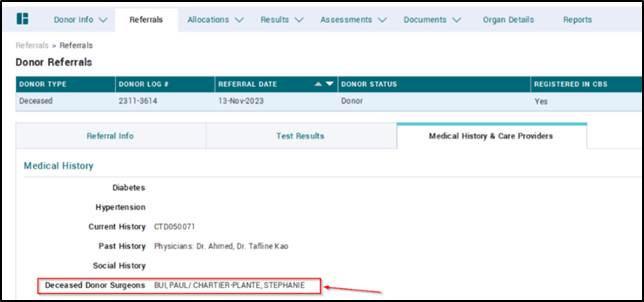
Deceased Donor out-of-province surgeons are captured in the Medical History & Care Providers tab for billing purposes.
Donor Referral > Procedure & Recipient Info (Living Donor)
The Procedure & Recipient Info (Living Donor) tab provides a view/update of the donor’s current procedure information. It also provides a display of the Living Donor’s Hospitalization, their latest 5 records. Selected recipient information linked to the Living Donor can be added.
SUPPORT-16843 In the Procedure & Recipient Info (Living Donor), the list in the Donor Retrieval Centre field for living donors has been updated to reflect all organ recovery facilities across Canada, as optional centres for selection.
Donor Organ Details
PROMIS 4 > Donor select > Organ Details
Once a donor registration is created in PROMIS, the system automatically creates a record in Organ Details. Selecting Donor Type, the field options can be edited.
Living Kidney, three rows will be created – Left Kidney, Right Kidney, Dual Kidney
Living Liver, three rows will be created – Left lobe, Right lobe, Whole Liver
Deceased Donor – all organs will be created as rows
Living and Deceased Donor Immunology displays the most recent record details for the donor’s HLA, along with historical immunology records. Donor immunology allows manual entry.
When an incoming offer is received from CTR, the donor (whose origin is Out of Province/Out of Country) profile is created along with serology and immunology records, so the details of the recipient’s donor record is available.
HLA autoload records will be automatically sent to CTR when the donor is registered in CTR.
Kidney Outgoing Offers provides a view summary of the donor’s status, registration in CTR, and submission of immunology to CTR. The Kidney Outgoing Offers provides the ability to make an electronic offer, accept, cancel or decline a kidney to HSP (Highly Sensitized Patient) kidney recipients.
When the button “Run Allocation” is selected, the latest allocation displays and ‘List Retrieved’ and Allocation Date will be updated. If Run Allocation is clicked but there is no allocation list for the donor, then only List Retrieved Date will be displayed.
SUPPORT-4429 Allocation of a deceased donor’s right and left kidneys can be made to two different recipients.
If the CBS National Registry Consent = Not Consented / Not Participating for kidney, the Kidney Outgoing Offers summary page will display the message “Kidney not consented for donation” with a blank page.
A Re-offer can be made on the Kidney Outgoing Offers to a recipient’s organ request, when the offer current state is Withdrawn, Decline, or Cancel Acceptance in the allocation list. The function would be the same as Make Offer.
Re-running the allocation list withdraws all existing offers, unless the offer state has been updated to organ shipped, which will no longer provide a withdrawn option.
Preview Allocation provides preview information of the present-time CTR Allocation List to see if the list has been updated and if there is another patient next in line available.
Document upload is available for both Living and Deceased Donors. Living Donor document upload will have all categories available.
Deceased Donor document upload will only have 3 available categories. When a deceased donor is registered in CTR, and a saved document is added in Deceased Donor Documents with the category of HLA Typing Report, the report will be sent to CTR.
The 3 categories for Deceased Donor are:
HLA Typing Report
Selection Report
Other
Living Donor Followup
PROMIS 4 > Donor select > LD Followup
SUPPORT-26027, SUPPORT-26266, SUPPORT-9412 Living Donor Follow up provides follow-up letter tracking with the donor for up to 80 years, after the donor organ was collected and the donor was discharged from hospital. Once the recipient transplant date is entered, the system will generate records initially in Living Donor Follow up. The Summary view will display the list of all follow-up visits planned for the living donor, as well as the status of the follow-up letter.
Living Kidney donors – the following fields will be automatically created:
Day of discharge from hospital
1 month
6 months
1 year
Then every year, if the donor status is not in ‘Closed’ status, the system will create a new record on January 1st of the new year.
Living Liver donors – the following fields will be automatically created:
Day of discharge from hospital
3 months
6 months
9 months
1 year
Then every year, if the donor status is not in ‘Closed’ status, the system will create a new record on January 1st of the new year.
Living Donor Follow up on-demand letters can be created with the add button.
The Living Donor Follow up cannot be created with the same test due date as an existing record, which will trigger an error message displaying “Same Test Due Date already exists”.
Option to include Donor Address (create printed envelopes for either centre donors). When printing, address field includes out of province address information.
In Modality Selection, the Treatment options have been updated as captured below:
Removed PD Assist
Renamed ‘PD Independent’ to ‘PD’
When Candidate for Independent Therapies = No, then Under Treatment options HD Home and PD are disabled.
SUPPORT-37450 The Reason for Independent Therapy Unsuitability is updated as below:
Significant cognitive impairment and no dialysis support person (brain damage, dementia)
Significant mental health barrier and no dialysis support person (psychiatric condition, active substance use disorder excluding: alcohol, marijuana, prescribed narcotics)
Unsuitable home conditions and lack of facility-based independent dialysis (unhoused, no space for supplies)
Under Potential Candidate for Transplant, when the Reason selection is set to “No” a new list value has been added:
No absolute contraindications, not a candidate based on team/nephrologist decision
KY TX Readiness Report
To maintain patient confidentiality, patients with the dialysis decision of conservative care are excluded from the KY TX Readiness Report.
Resolved Issues
Dialysis Status
PROMIS 4 > Renal > Dialysis Status
Three list options have been added to Dialysis Status end reasons:
Temporary change to HD/HDPD (specify reasons in PD module)
Permanent change to HD (specify reasons in PD module)
Permanent change to HDPD (specify reasons in PD module)
SUPPORT-35482 In Dialysis Status when Dialysis Type = Peritoneal Dialysis, then the subtype is mandatory.
SUPPORT-34466 Under Dialysis Status, the dialysis type column wraps text so that the training types can be differentiated.
PROMIS 4 > Patient select > Renal > Dialysis Access > (PD Access) > Access Details > Access Management > Infections > Test and Results > Add Test Order
SUPPORT-39015 In Dialysis Access under Access Management > Infections > Test and Results, a new list value of ‘Other’ has been added to the Test Centre list, to classify a test centre for patients who are from out-of-province.
Medication Profile Report
PROMIS 4 > Reports > Centre or Worklist Reports > Worklist Reports > Medication > Medication Profile
SUPPORT-37850 All dose types display the start and end dates on medications summary view. These changes are reflected in the patient panel of current medications and the Medication Profile report.
SUPPORT-36113 On the Medication Profile report, a page break ensures the generic and brand name medications display on one page.
SUPPORT-37098 The BCCDC TB IGRA-QFT requisition includes the name for Dr. Victoria Cook and includes her MSP number.
Tolvaptan Application menu
Med/Order > Tolvaptan (PKD) > Add – Application
The Tolvaptan Application menu item has temporarily been hidden from view as per request.
Tolvaptan Discontinuation Report
Med/Other > Tolvaptan (PKD) > Discontinuation Form > Generate Report
The following changes have been made to the Tolvaptan Discontinuation Report:
Tolvaptan dose and bloodwork components have been removed from the discontinuation report.
The name “MacDonald’s Pharmacy” has been updated to “MacDonald’s Prescriptions Renal Pharmacy” and indicates the fax location.
A text message has been added to the report, above the section with header “For Physicians”, noting that the patient has stopped Tolvaptan therapy, with instructions regarding ongoing monitoring purposes.
The discontinue reasons for Tolvaptan’s list has been updated to include in the following order:
Intolerable aquaretic symptoms
Patient approaching ESKD
Process issue (e.g. bloodwork delayed)
Patient preference
Abnormal liver enzymes (see recommended testing note)
Other blood work abnormality, please specify
Other, please specify
The Tolvaptan Discontinuation form fits onto one printed page.
SUPPORT-35281 The following changes have been made to the Post-COVID Education sessions, for Session Type selected as Large Group Education or Group Therapy.
Large Group Education – the following have been removed from the list:
Fatigue
Mental Health
Large Group Education – the following have been added to the list:
Dysautonomia & POTS (info)
Fatigue 1
Fatigue 2
Fatigue 3
Mental Health 1
Mental Health 2
Monthly Forum
Navigating Finances
Mindfulness
Large Group Education – the following have been relabeled (old -> new):
Return to Activity > Accommodations & Return to Work
Shortness of Breath > Breathlessness
Introduction/Orientation > Intro Session
Financial Management and Return to Work > Work and Finance
Group Therapy – the following have been removed from the list:
Fatigue
Group Therapy – the following have been added to the list:
Breathing & Relaxation
Coping with Post COVID
Fatigue & Pacing
Mindfulness
Group Therapy – the following have been relabeled (old -> new):
SUPPORT-37697 Patients who have an access created or first used after the report date are not included in the report results based on date parameters. Report captures the correct patients as expected.