
Release Date
November 29, 2020
New Features
- UGFR Values in Lab Results
- Physical exam graphs displaying patient’s height, weight and blood pressure
- “View External” button added to Comorbidities; view data recorded in other systems
- Post COVID Recovery Centre
- New columns in Immunization History summary
Classic features moved to PROMIS 4
Retiring from Menu in Classic
- Providers Classic Menu
- Pharmacies Classic Menu
- Laboratories Classic Menu
- Classic Patient Photo Upload
- User Information Classic Menu
- Recipient Immunology form
- General Data Entry QA report
- Message regarding Recipient Immunology
Improvements to PROMIS 4 Modules & Reports and Classic
- Patient Worklists
- Transplant Flowsheet
- Patient Monthly Results Report
- Medication Change Report
- PKD Tolvaptan
- PD
- GN Oral IS App
- Demographics > Drug Allergies
- Recipient Immunology
- Transplant in Classic / Legacy
- Patient Overview
- Classic > Medications
Resolved Issues in PROMIS 4 Modules & Reports and Classic
- Biopsy
- TB Services
- ACP
- Demographics
- Lab List Builder
- Lab Results
- Labs Graph
- Lab Results Flowsheet
- Medication Change Report
- Transplant Flowsheet
- Glomerulonephritis Flowsheet
- Recipient Immunology
- Inputted Labs in Classic
- Classic > Clinic Scheduling
- PROMIS Portal > Watson formula
- Other
New Features
uGFR Values in Lab Results
- uGFR values will display in Lab Results of patients aged 2 to 19 based on the creatinine, eGFR, height and weight values.
- Viewing uGFR history data from CKD registration date onwards, for all patients transplanted as children and current pediatric patients.
Lab Results
PROMIS 4 > Patient’s Overview > Orders/Results > Labs > Labs Graph
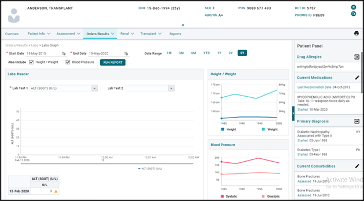
- Physical Exam Labs Graphs: Graphs for a patient’s height, weight and blood pressure can be displayed on the Labs Graph page.
- Hovering mouse over Labs Graph: Lab values are displayed when a mouse is hovered over the Labs Graph page and height and weight graphs have units displayed too.
- Checkboxes added to Labs Graph screen: Checkboxes to include BP, Height and Weight are added to the Labs Graph screen which show graphs for blood pressure and height and weight.
Patient Panel (Comorbidities)
PROMIS 4 > Patient’s Overview > Patient Panel > Comorbidities
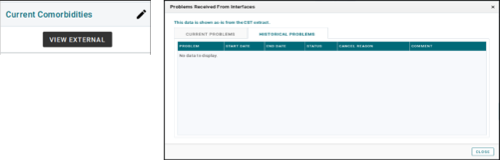
- Comorbidities section of Patient Panel: A new button labelled “View External” is added to the Comorbidities section on the Patient Panel. This button opens a display of any current and historical comorbidities recorded, which have been received from other systems, where an interface is in place, in a window labelled “Problems Received From Interfaces”.
- Important: these data are displayed as entered in the source system and are not auto-loaded to PROMIS. Comorbidities displayed here must still be entered in PROMIS, as required, to meet CORR and other reporting requirements.
Post COVID Recovery
- New centre added in PROMIS 4: The SMH-PCR Centre is added to the Centres drop-down list and COVID-19 reports drop-down list.
Patient Infectious Status / Immunization Hx
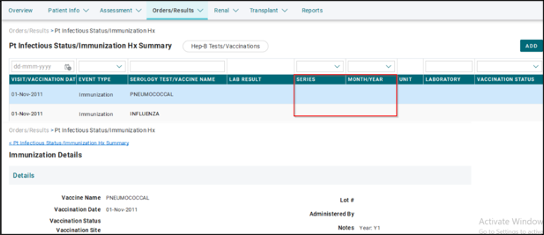
- SUPPORT-11743 New columns in Immunization History summary: A column each for Series and Year are added to the Immunization History summary screen.
Classic features moved to PROMIS 4
Patient Photo Upload
PROMIS 4 > Patient’s Overview > Patient Banner > Patient Photo Thumbnail
- Patient Photo Modal: The patient’s photo can be uploaded into PROMIS using the new Patient Photo upload tool/modal in PROMIS 4.
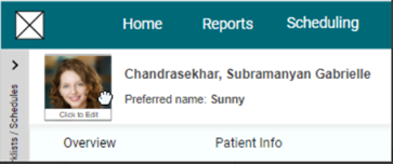
- Default photo: The original default photo is displayed if the patient has no photo uploaded.
- Editing: The patient’s photo can be updated, cropped, saved and deleted through the Patient Photo modal.
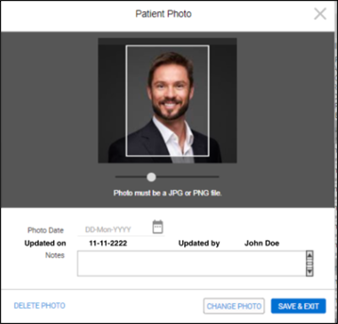
- Patient Photo Details: Details like photo date, update date and notes can be added to the patient’s photo through the photo modal window.
- Patient’s photo in search results: The patients’ photos are displayed in the search results in PROMIS 4.
- Patient Photo Requirements: A warning message is displayed if image size is over 5MB and if the width-to-height ratio is less than 0.75.
- Thumbnail of patient’s photo: A photo thumbnail is created when the slider bar is used in the photo modal window.
- Displaying Patient’s Photo in Modal: The patient’s current photo is displayed in the Modal when clicking on the thumbnail on the Patient Banner.
- Patient Photo in mobile App: The patient photo requirements in the PROMIS mobile app are the same as in the desktop environment.
Retiring from Menu in Classic
- Providers Classic Menu: The Providers module is removed from Classic; can be accessed in PROMIS 4.
- Pharmacies Classic Menu: The Pharmacies module is removed from Classic; can be accessed in PROMIS 4.
- Laboratories Classic Menu: The Laboratories module is removed from Classic; can be accessed in PROMIS 4.
- Classic Patient Photo Upload: The Patient Photo Upload module is removed from Classic; can be accessed in PROMIS 4.
- User Information Classic Menu: The User Information module is removed from Classic; can be accessed in PROMIS 4.
- Recipient Immunology form: The Recipient Immunology module is removed from Classic; can be accessed in PROMIS 4.
- report in Classic. The General Data Entry QA report is removed from Classic; can be accessed in PROMIS 4.
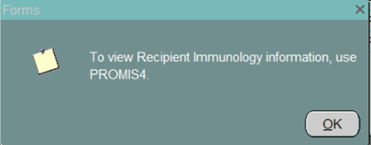
- regarding Recipient Immunology: A message to view Recipient Immunology information in PROMIS 4 is displayed in different Transplant forms.
Improvements
Patient Worklists
PROMIS 4 > Main Navigation Bar > Maintenance > Patient Worklist
- Worklists can be filtered by ‘Any Lab Test’ to allow users to look up patients by latest bloodwork.
- Patients can be removed from the Worklist.
- Cross platform for temporary worklists. A temporary worklist created in Classic can be used in PROMIS 4.
- Date range for the “Any Lab Test” filter: The “Any Lab Test” filter can include lab results for up to 1 year in the past.
- Worklist created in Classic can be modified and used in PROMIS 4.
- SUPPORT-13218 Removing patients from a worklist: A “Remove” button is added to Patient Worklist to remove patients from worklists.
Transplant Flowsheet
PROMIS 4 > Patient’s Overview > Reports > Transplant Flowsheet (for a single patient)
PROMIS 4 > Main Navigation Bar > Reports > Worklist Reports > Transplant Flowsheet (for a worklist)
- Rearrangement of lab tests on the Transplant Flowsheet: The following re-ordering of tests are made on the Transplant Flowsheet for the Lung, Double Lung and Heart-Lung Transplant programs.
- The IGG test is placed before EBV PCR.
- A new arrangement for select tests in the printed report are in order of: BUN, HGB, PLT, WBC, NEUT, EOSINOPHIL.
- Adding BNP to Transplant Flowsheet: The lab test BNP is added to the Transplant Flowsheet for Lung, Double Lung and Heart-Lung Transplant programs and is placed before ALB.
- Transplant Flowsheet parameters and audit match: The parameter selection for the Transplant Flowsheet matches the audits in the database.
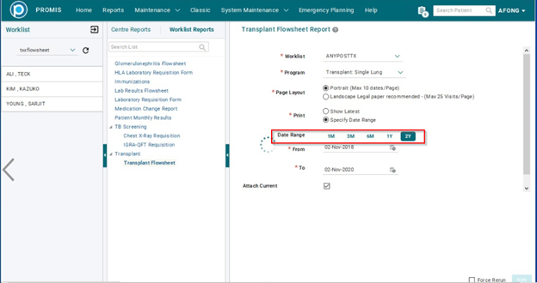
- Pre-set date ranges on Transplant Flowsheet: The available pre-set date ranges on the Transplant flowsheet are 1 month, 3 months, 6 months, 1 year and 2 years.
Patient Monthly Results Report
PROMIS 4 > Patient’s Overview > Reports > Patient Monthly Results
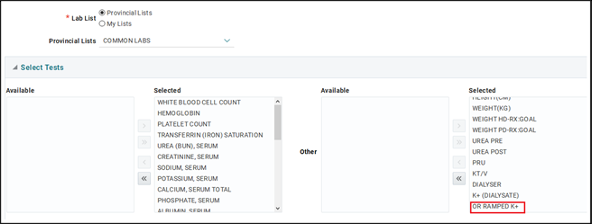
- New optional lab result in the Patient Monthly Results report: The lab test “OR Ramped K+” is available as an option in the Patient Monthly Results report.
Medication Change Report
PROMIS 4 > Reports > Worklist Reports > Medication Change Report
- Dates on the Medication Change report: The requirement of the “From” and “To” dates on the Medication Change report is set to a range of 14 days.
- New mandatory fields on the Medication Change report: The “Management Centre” and “Centre Type” fields are now mandatory parameters on the Medication Change report.
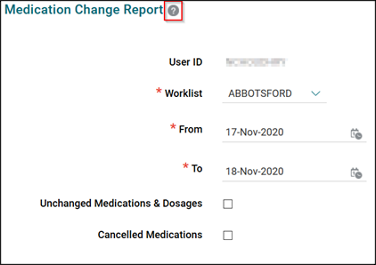
- Help button in Medication Change report: A button depicting a question mark is added to the Medication Change Report parameters screen, which links to the Help Guide.
PKD Tolvaptan
PROMIS 4 > Patient’s Overview > Renal > PKD Tolvaptan
Tolvaptan Discontinuations
- New header on Tolvaptan page: Tolvaptan page header now reads “Tolvaptan Refills and Discontinuations”.
- Tolvaptan Discontinued Refills on Summary page: An option to display discontinued Tolvaptan records on the summary page is available.
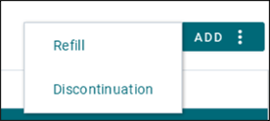
- Drop-down buttons added: Drop-down buttons for a list of values are added to the “Tolvaptan Dose” and “Monitoring Frequency” fields in the Tolvaptan Refills and Discontinuation forms.
- Report for Tolvaptan Refills and Discontinuation: A report for Tolvaptan Refills and Discontinuation can be generated.
- Cancelling a Tolvaptan Discontinuation form: Functionality to cancel a Tolvaptan Discontinuation is added.
- Displaying details of cancelled Tolvaptan Discontinuation forms: The details of a cancelled Tolvaptan Discontinuation form can be displayed.
- Display cancelled Tolvaptan Discontinuation form records: All cancelled Tolvaptan Discontinuation form records can be displayed on the summary page.
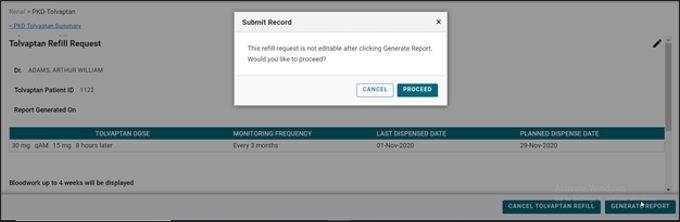
- Message about Tolvaptan Refills: A message is displayed informing that a Tolvaptan Refill request is not editable after generating a Tolvaptan Discontinuation report.
- Tolvaptan Discontinuation form: A Tolvaptan Discontinuation form can be added and edited.
- Displaying the details of a Tolvaptan Discontinuation form: The details of a Tolvaptan Discontinuation form can be displayed and viewed.
- Auditing record for Tolvaptan reports: An auditing record of the user’s username, date and time is kept in PROMIS auditing records for the Tolvaptan Discontinuation report.
Tolvaptan Refills
- Cancelling Tolvaptan records: Tolvaptan records can be cancelled.
- Viewing cancelled Tolvaptan records: The “Include Cancelled Records” button displays cancelled Tolvaptan refills.
- Re-printing Tolvaptan refill reports: The Tolvaptan Refill report can be printed multiple times after it is generated.
- Searching Tolvaptan Refill records: The workflow for searching Tolvaptan Refills works in the right order.
- SUPPORT-12502 PKD Tolvaptan report can be regenerated repeatedly: The PKD Tolvaptan report can be regenerated in the event the report fails, but continues to prevent edits to the data after initial generation of the report.
PD
PROMIS 4 > Renal > Dialysis Access (PD) > Procedure
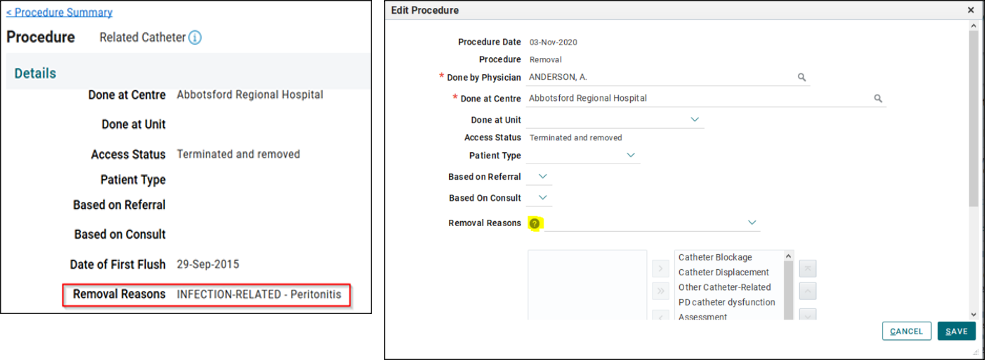
- SUPPORT-10719 Removal Reason of a PD catheter: The removal reason for a PD catheter displays both the category and removal reason on the view page. A button depicting a question mark is on the add/edit page for the procedure, which links to the Help Guide.
PROMIS 4 > Renal > Dialysis Access (PD) > select an access record > Access Management > Transfer Sets
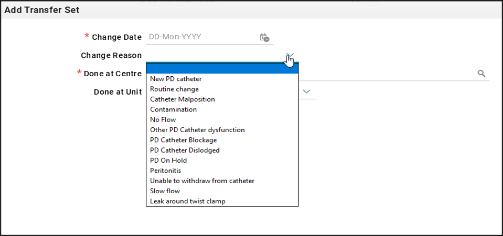
- New Transfer Set change reasons: Two new reasons are added to the list of values in the Change Reason drop-down list on the Transfer Set screen. (*New values are available in PROMIS as of November 19, 2020)
- Slow Flow
- Leak around twist clamp
GN Oral IS App
PROMIS 4 > Patient’s Overview > Assessment > GN Oral IS App
- Title change on the GN Oral IS App page: The title of the GN Oral IS App page is changed to “Glomerulonephritis Oral Immunosuppression Drug Application Status Summary”.
- Adding GN Oral Immunosuppression Drug Application: An application for GN Oral Immunosuppression Drugs can be added for a patient provided that the patient is registered in a renal program and that only one application a day is entered with the same physician.
Drug Allergies
Path: PROMIS 4 > Patient’s Overview > Demographics
- Drug allergies received from SPH Cerner: Drug allergies entered in SPH Cerner are shown in PROMIS, on patients who are missing drug allergy data.
Recipient Immunology
PROMIS 4 > Patient’s Overview > Transplant > Recipient Immunology
- Immunology report can be generated directly: The Immunology report is generated in real-time when user clicks ‘Run Immunology Report’ in PROMIS 4 from Recipient Immunology Summary screen. No wait time is required for a notification.
- LX PRA values on HLA Antibody Profile History page: LX PRA I and LX PRA II are added to the HLA Antibody Profile History page and are removed from the summary screen.
- Updates to CTR-HLA Dictionary: The PROMIS HLA Dictionary is updated to synchronize with CTR HLA Dictionary.
- Old HLA values that are displayed for Serology: Old Serological Typing values are shown in Serological typing data-fields in HLA section in Recipient Immunology.
- AB comments in Case report: AB comments will be populated in Immunology Case report.
- HLA comments in Case report: HLA comments will be populated in Immunology case report.
- Overriding Immunology data when an updated case report is received from Histotrac: The HLA/AB/PRA/Case Report is overridden when an updated case report is sent to PROMIS by Histotrac interface.
- Default “User Confirmation” value for HLA Typing: The “User Confirmation” field in HLA Typing defaults to “Yes”.
- Antibody specificities data sent to CTR: Antibodies specificities are sent from PROMIS to CTR and the most recent antibody specificities are displayed on the Recipient Immunology summary page.
- Unacceptable DQAB values to CTR: Unacceptable DQAB values are sent to CTR at the time of activation in PROMIS and the Immunology Report shows Unacceptable DQ Alpha/Beta combination information.
- Allele specific data is sent at Activation: Allele specific data is sent to CTR at the time the patient is activated in PROMIS.
- HLA Typing information sent to CTR: The HLA Typing information is sent to CTR at the time of activation in PROMIS.
Transplant in Classic / Legacy
Classic > Transplant > Activation
- SUPPORT-12293 Pop-up message when activating a lung transplant patient: The collection date and HLA/Antibody data entry process is automated in the Activation form for Lung Transplant and a pop-up message will not appear.
Classic > Transplant > Reports > Living Donor Reports > Kidney Follow-up Letter (SPH)
- PROMIS as a recipient of the Kidney Follow-up Letter: PROMIS is added to the “Copy To:” section of the Kidney Follow-up Letter (SPH).
Classic > Transplant > Donor
- New Donor referral facility: North Island Hospital is added as a donor referral facility in PROMIS.
- New fields in Donor Registration Form: The Country and Province of Death fields are added to the Donor Registration form.
Classic > Legacy BCT > Medications > Pharmacy
- SUPPORT-12323 Increase physician field character length: The physician field in the Pharmacy Data Entry form can accept up to 250 characters.
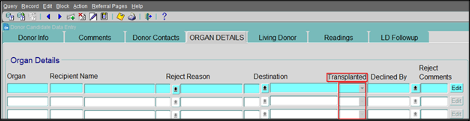
Classic > Legacy BCT > Donor – Referral > Organ Details
- SUPPORT-11879 New field in Organ Details form: A new field “Transplanted” is added to the Organ Details form in Legacy, with Yes/No options.
Patient Overview
PROMIS 4 > Patient’s Overview > Patient Banner
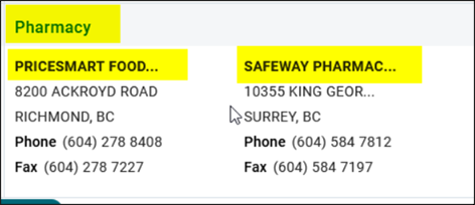
- SUPPORT-2063 Second pharmacy on the patient banner: The patient’s second preferred pharmacy will show on the patient banner along with the first preference.
PROMIS 4 > Patient’s Overview > Patient Info > Program Registration
- SUPPORT-466 Organization of the Patient enrollment screen: The patient enrollment screen is re-organized to ensure better use of space and avoid cramping of data at the bottom.
Medications
Classic > Monitoring > Medications
- SUPPORT-11662; SUPPORT-11475 Medication removed from list of values: The medication Mycophenolic Acid has been removed from the list of values in the medication module.
Resolved Issues
Biopsy
PROMIS 4 > Patient’s Overview > Orders/Results > Biopsy
- Biopsy results records start with upper case letters: All Biopsy results start with upper case letters in the list of values drop-down.
TB Services
PROMIS 4 > Patient’s Overview > Assessment > TB Services
- Width of Physician search box in TB Services: The width of the Physician search box in the TB Services Completes tab is standard and consistent with other search boxes within PROMIS.
- Printing a record in TB Services: A TB Assessment record of a patient can be printed by using the print icon.
ACP
PROMIS 4 > Patient’s Overview > Assessment > ACP > ACP Documents
- Uploading documents in ACP module: A document is uploaded correctly in the ACP Documents tab without replacing any previously uploaded documents.
Demographics
PROMIS 4 > Patient’s Overview > Patient Info > Demographics
- Appearance of fields in Demographics: The “Special Needs” and “Drug Allergies” fields are displayed separately and there is no horizontal scroll bar.
Lab List Builder
PROMIS 4 > Main Navigation Bar > Maintenance > Lab List Builder
- List refresh in Lab List Builder: The tests listed in “My Selected Lab Tests” are refreshed according to the Lab List selected.
Lab Results
PROMIS 4 > Patient’s Overview > Orders/Results > Lab Results
- Urea related lab results: The previously missing lab results for pre and post Urea and calculated Urea values are available in PROMIS.
Labs Graph
PROMIS 4 > Patient’s Overview > Orders/Results > Labs > Labs Graph
- Labs graph lines show correctly: The lines of the graph appear as intended when refreshed.
Lab Results Flowsheet
PROMIS 4 > Patient’s Overview > Reports > Lab Results Flowsheet (for a single patient)
PROMIS 4 > Main Navigation Bar > Reports > Worklist Reports > Lab Results Flowsheet (for a worklist)
- SUN-9900: Number of columns in Lab Results Flowsheet: The Lab Results Flowsheet displays only the columns for the tests selected in the parameters.
Medication Change Report
PROMIS 4 > Reports > Worklist Reports > Medication Change Report (for a worklist)
PROMIS 4 > Reports > Centre Reports > Medication Change Report (for a centre)
- Date range solution in Medication Change report: When changing/adjusting dates in the Medication Change report, the “From” date should be changed first.
- Dosage dates on the Medication Change report for a Centre: The start and end dates of dosages displayed in the Medication Change centre report are within the date range the report was generated.
- Dosages included in the Medication Change report for a worklist: All dosages whose start date fall within and including the date range of the Medication Report for a worklist are included in the report.
Transplant Flowsheet
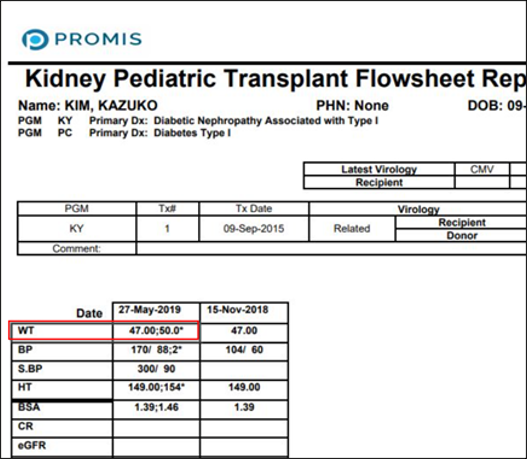
- Concatenation of results on the Transplant Flowsheet: The values for weight taken on different times of the same day are concatenated in the Transplant Flowsheet.
Glomerulonephritis Flowsheet
PROMIS 4 > Patient’s Overview > Reports > Glomerulonephritis Flowsheet (for a single patient)
PROMIS 4 > Main Navigation Bar > Reports > Glomerulonephritis Flowsheet (for a worklist)
- Update of parameters in GN Flowsheet: The “User Lab List” field is updated when the “Lab List Source” is changed from “Provincial List” to “Other User Published List.”
Recipient Immunology
PROMIS 4 > Patient’s Overview > Transplant > Recipient Immunology
- Content display in Immunology report: The content on the Immunology report is displayed clearly with no overlapping text.
Inputted Labs
Classic > Monitoring > View Inputted Labs
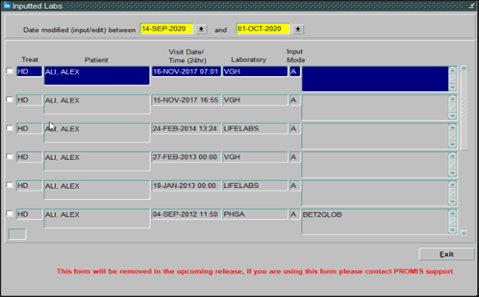
- Inputted Labs in Classic: The Inputted Labs module in Classic will show a message “This form will be removed in the upcoming release, if you are using this form please contact PROMIS Support.”
Clinic Scheduling
Classic > Scheduling > Clinic Visits > Centre Schedule Weekly
- SUPPORT-13759 Printing Clinic Schedule Activity report: The “Print” button in Clinic Schedule Activity report is removed and this report can be printed using the “Preview Report” button.
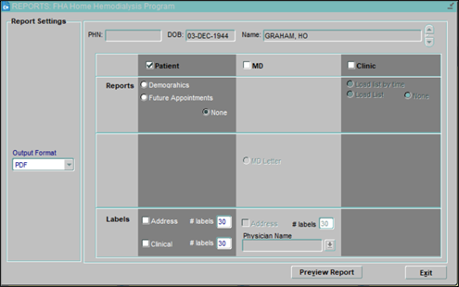
- SUPPORT-12027 Exiting the Centre Schedule Weekly form: The Exit button on the Centre Schedule Weekly Report Settings screen is working as designed.
PROMIS Portal
PROMIS Portal Page > Search for Watson formula
- Watson Formula on PROMIS Portal: The user interface on the Watson Formula calculator is fixed.
Other
PROMIS 4 > Patient’s Overview
- Access to patient modules prior to registration: Access to modules containing patient information is limited if a patient is not registered at a Centre to which the user has access.
- Date validation in several modules: Date fields in multiple modules in PROMIS 4 are validated and an error message appears if the date entered is before January 1, 1900.
PROMIS 4 > Patient’s Overview > Patient Banner
- Patient banner alignment: The patient banner is aligned when a patient overview is displayed in PROMIS 4.